<?xml version="1.0" encoding="utf-8"?><feed xmlns="http://www.w3.org/2005/Atom" ><generator uri="https://jekyllrb.com/" version="3.9.5">Jekyll</generator><link href="https://theo.lol/feed.xml" rel="self" type="application/atom+xml" /><link href="https://theo.lol/" rel="alternate" type="text/html" /><updated>2026-03-29T16:06:05+00:00</updated><id>https://theo.lol/feed.xml</id><title type="html">theo, softserve developer</title><subtitle>blog and website of a Canadian software engineer living in the US</subtitle><entry><title type="html">A recipe for steganogravy 🍲</title><link href="https://theo.lol/python/ai/steganography/seo/recipes/2026/03/27/a-recipe-for-steganogravy.html" rel="alternate" type="text/html" title="A recipe for steganogravy 🍲" /><published>2026-03-27T00:00:00+00:00</published><updated>2026-03-27T00:00:00+00:00</updated><id>https://theo.lol/python/ai/steganography/seo/recipes/2026/03/27/a-recipe-for-steganogravy</id><content type="html" xml:base="https://theo.lol/python/ai/steganography/seo/recipes/2026/03/27/a-recipe-for-steganogravy.html"><![CDATA[<details>
  <summary>author's note</summary>
  The following justification is nonsense, I just thought the idea of encoding data in recipe blogs was fun and silly.
</details>

<p>With AI scrapers and government agencies roaming the internet and snarfing down every last byte (hoping to profit when you mistakenly publish useful information online), it’s gotten harder to share data without it becoming a future liability.</p>

<p>One wrong step and you find yourself accidentally contributing to automating your own job, having your identity stolen, or offending the kind of person that seems to always be complaining about other people being offended.</p>

<p>What if we could hide data in a place <em>no one would ever think to look</em>? What if we could submerge our delicious morsels of knowledge in a flavorless slop so devoid of nutritional value even the most ravenous AI agents would spit it out?</p>

<h2 id="tbrockmanrecipe-blog-encoding"><a href="https://github.com/tbrockman/recipe-blog-encoding"><code class="language-plaintext highlighter-rouge">tbrockman/recipe-blog-encoding</code></a></h2>

<p>is a vibe-coded (and at least partially plagiarized<sup id="fnref:1" role="doc-noteref"><a href="#fn:1" class="footnote" rel="footnote">1</a></sup>) Python CLI that allows you to encode data as completely natural language<sup id="fnref:2" role="doc-noteref"><a href="#fn:2" class="footnote" rel="footnote">2</a></sup> using <a href="https://aclanthology.org/D19-1115/">neural linguistic steganography</a>.</p>

<p>Given a shared prompt and a model, it can hide your secrets where they’re least expected: <strong>recipe blog introductions</strong>.</p>

<p><a href="https://github.com/tbrockman/recipe-blog-encoding/blob/main/example.sh"><code class="language-plaintext highlighter-rouge">example.sh</code></a></p>
<div class="language-sh highlighter-rouge"><div class="highlight"><pre class="highlight"><code>python main.py encode <span class="se">\</span>
  <span class="nt">--message</span> <span class="s2">"https://www.nokings.org/"</span> <span class="se">\</span>
  <span class="nt">--stego-file</span> stego_output.txt <span class="se">\</span>
  <span class="nt">--model</span> <span class="s2">"models/Qwen3-32B-Q4_K_M.gguf"</span> <span class="se">\</span>
  <span class="nt">--prompt</span> <span class="s2">"&lt;|im_start|&gt;user
You are a blog author writing your stereotypical recipe introduction, aiming to maximize the chances of your recipe being seen by gaming your articles SEO, without being too verbose. Output only the recipe introduction and nothing else, using a maximum of 12 paragraphs. Choose a random recipe.&lt;|im_end|&gt;
&lt;|im_start|&gt;assistant
&lt;think&gt;

&lt;/think&gt;"</span>
</code></pre></div></div>

<p>which produces something like the following:</p>

<p><a href="https://github.com/tbrockman/recipe-blog-encoding/blob/main/example-out.md"><code class="language-plaintext highlighter-rouge">example-out.md</code></a></p>
<div class="language-md highlighter-rouge"><div class="highlight"><pre class="highlight"><code>Looking for a quick and delicious way to impress your family and friends? This <span class="gs">**One-Pan Garlic Butter Chicken with Herbed Potatoes**</span> is the answer. Packed with flavor and easy to make, this dish is perfect for weeknight dinners or weekend feasts. What makes it stand out? It requires only one pan, minimizes cleanup, and allows the rich flavors to infuse perfectly while everything cooks.

The chicken is seasoned with garlic, onion powder, and a touch of paprika, then seared to golden perfection. But the real star here is the buttery herbed potatoes, tender and slightly crispy, soaking up every ounce of aromatic goodness. A quick toss with fresh parsley and oregano adds the warmth that makes this recipe so special.

This recipe is optimized for search engines with keywords like <span class="ge">*easy one pan chicken recipe*</span>, <span class="ge">*garlic butter chicken*</span>, and <span class="ge">*herbed potato side dish*</span>. Whether you're a seasoned chef or a beginner in the kitchen, this dish is a breeze to make and guaranteed to deliver big flavor.

[ ... ]
</code></pre></div></div>

<p>Which any reader, knowing the original prompt and model used, can use to recover the political messaging hidden in your favorite garlic butter chicken recipe:</p>

<div class="language-sh highlighter-rouge"><div class="highlight"><pre class="highlight"><code>python main.py decode <span class="nt">--stego-file</span> stego_output.txt <span class="nt">--model</span> <span class="s2">"models/Qwen3-32B-Q4_K_M.gguf"</span> <span class="nt">--prompt</span> <span class="s2">"..."</span>

<span class="c"># some processing ... ⌛</span>

<span class="o">======================================================================</span>
RECOVERED SECRET MESSAGE:
<span class="o">======================================================================</span>
https://www.nokings.org/
<span class="o">======================================================================</span>
</code></pre></div></div>

<p>Just how grandma would have made it.</p>

<h2 id="how-it-works">how it works</h2>

<details>
    <summary>author's note</summary>
    To be a bit less verbose, we omit certain details like 1) how we embed the payload length into the output so the decoder knows how many bits to decode later, 2) how we use quantization so we're not operating on floats, and 3) how we deal with the issue of ambiguous re-tokenization when decoding, etc.
</details>

<p>The implementation largely follows <a href="https://www.artkpv.net/Tool-Arithmetic-Coding-for-LLM-Steganography/">arithmetic coding steganography</a>. At a high-level, you can imagine the following:</p>

<ol>
  <li>We convert our secret into a binary fraction which represents a point somewhere on a number line between [0, 1).</li>
  <li>We use the model’s next token probability distribution to carve out adjacent intervals on the line, where the width of each interval is proportional to the token’s probability.</li>
  <li>We repeatedly choose tokens whose interval contains our point, narrowing the interval further and further, until enough of the leading bits of the start and end points of the interval agree, such that we’ve encoded our message.</li>
</ol>

<p>Here’s a simple example with a 3-bit secret:</p>

<div class="language-plaintext highlighter-rouge"><div class="highlight"><pre class="highlight"><code>secret: 1 0 1
  → binary fraction: 0.101
  → point on [0, 1): 0.625

step 1: interval [0, 1)
  "The"      [0,    0.4)
  "Looking"  [0.4,  0.55)
  "This"     [0.55, 0.8)   ← 0.625
  "A"        [0.8,  1)
  → select "This", narrow to [0.55, 0.8)

step 2: interval [0.55, 0.8)
  " recipe"  [0.55, 0.7)   ← 0.625
  " is"      [0.7,  0.76)
  " One"     [0.76, 0.8)
  → select " recipe", narrow to [0.55, 0.7)

step 3: interval [0.55, 0.7)
  " is"      [0.55, 0.625)
  " uses"    [0.625, 0.67) ← 0.625
  " for"     [0.67,  0.7)
  → select " uses", narrow to [0.625, 0.67)

[0.625,  0.67) in binary:
[0.101..., 0.101...]
 ^^^        ^^^
leading bits agree: 1 0 1 → secret recovered ✓
</code></pre></div></div>

<p>The generated text would then read: “This recipe uses”</p>

<p>Decoding is just the reverse: run the same model with the same prompt, reconstruct the probability distribution at each step, and read the secret bits back out by checking which tokens were used. It’s important to note that both sides need the <strong>exact same model, quantization, top-k, and prompt</strong> – any mismatch and the distributions diverge, producing garbage.</p>

<h2 id="limitations">limitations</h2>

<p><strong>it’s pretty wasteful</strong></p>

<p>You’re loading massive models to encode and decode a small amount of information, slowly, at &lt; 2-3 bits/token. It’s not a great use of compute.</p>

<p><strong>bpe tokenization</strong></p>

<p>It turns out that if you pick a token during encoding, decode it to text, and then re-tokenize that text, you don’t always get the same token back. For instance, if the text so far tokenizes to <code class="language-plaintext highlighter-rouge">[..., "hel"]</code> and the model picks the <code class="language-plaintext highlighter-rouge">"lo"</code> as the next token, the combined text <code class="language-plaintext highlighter-rouge">"hello"</code> might re-tokenize as a single <code class="language-plaintext highlighter-rouge">"hello"</code> rather than <code class="language-plaintext highlighter-rouge">"hel" + "lo"</code>. Then, when decoding, the decoder sees a completely different token at that position and everything after it diverges.</p>

<p><code class="language-plaintext highlighter-rouge">claude's fix</code>: Add a filter that, at each step, tests whether a candidate token would survive a round-trip through decoding and tokenization. Tokens that wouldn’t are excluded from the CDF before any interval math happens. You lose some encoding capacity, but you can be certain that if your message can be encoded, it can also be decoded.</p>

<p><strong>model end-of-sequence can be reached before the secret is fully encoded</strong></p>

<p><code class="language-plaintext highlighter-rouge">question:</code> What do we do if the prompt we’ve chosen doesn’t provide a path to generate sufficient tokens to encode our secret, converging on end-of-sequence before giving us enough bits?</p>

<p><code class="language-plaintext highlighter-rouge">answer:</code> 🤷 choose a better prompt and try again.</p>

<p><strong>security</strong></p>

<p>The prompt acts as a shared key, but it’s a leaky one. The generated text is statistically conditioned on the prompt, where the prompt is partially revealed by its own output (which is generally not seen as an ideal property for encryption methods).</p>

<p><code class="language-plaintext highlighter-rouge">threat model</code>: passing a note to your friend about which girl you like in class, through an untrusted intermediary</p>

<p><strong>local LLM only</strong></p>

<p>Not that it’s not possible to use any remote APIs (it should be so long as they provide sufficient determinism and logits), local’s just all that was implemented.</p>

<h2 id="try-it-out">try it out</h2>

<p>Available on <a href="https://colab.research.google.com/github/tbrockman/recipe-blog-encoding/blob/main/notebook.ipynb">Google Collab</a> or from source:</p>

<div class="language-sh highlighter-rouge"><div class="highlight"><pre class="highlight"><code>git clone https://github.com/tbrockman/recipe-blog-encoding/
<span class="nb">cd </span>recipe-blog-encoding
python3 <span class="nt">-m</span> venv <span class="nb">env
source env</span>/bin/activate
pip <span class="nb">install</span> <span class="nt">-r</span> requirements.txt
python main.py <span class="nt">--help</span>
</code></pre></div></div>

<p>have fun cooking ✌️</p>

<div class="footnotes" role="doc-endnotes">
  <ol>
    <li id="fn:1" role="doc-endnote">
      <p>Subsequent investigation suggests that <a href="https://github.com/artkpv/arithmetic-coding-steganography/"><code class="language-plaintext highlighter-rouge">artkpv/arithmetic-coding-steganography/</code></a> is likely where Claude found inspiration for the implementation <a href="#fnref:1" class="reversefootnote" role="doc-backlink">&#8617;</a></p>
    </li>
    <li id="fn:2" role="doc-endnote">
      <p>As determined by the shared prompt and model <a href="#fnref:2" class="reversefootnote" role="doc-backlink">&#8617;</a></p>
    </li>
  </ol>
</div>]]></content><author><name>Theodore Brockman</name></author><category term="python" /><category term="ai" /><category term="steganography" /><category term="seo" /><category term="recipes" /><summary type="html"><![CDATA[how to hide juicy data in plain sight]]></summary></entry><entry><title type="html">Vector similarity in the browser using `pglite`, `codemirror`, and `react`</title><link href="https://theo.lol/example/dev/pglite/vector/mantine/react/2025/04/08/pglite-vector-search.html" rel="alternate" type="text/html" title="Vector similarity in the browser using `pglite`, `codemirror`, and `react`" /><published>2025-04-08T00:00:00+00:00</published><updated>2025-04-08T00:00:00+00:00</updated><id>https://theo.lol/example/dev/pglite/vector/mantine/react/2025/04/08/pglite-vector-search</id><content type="html" xml:base="https://theo.lol/example/dev/pglite/vector/mantine/react/2025/04/08/pglite-vector-search.html"><![CDATA[<p>github repo –&gt; <a href="https://github.com/tbrockman/pglite-vector-search"><code class="language-plaintext highlighter-rouge">tbrockman/pglite-vector-search</code></a></p>

<iframe src="https://theo.lol/pglite-vector-search/" width="100%" height="400px" loading="lazy">
  <noscript>
    <p>
      Interactive iframe unavailable.
      <a href="https://theo.lol/pglite-vector-search/">Open target in a new tab</a>.
    </p>
  </noscript>
</iframe>

<p>An interactive example of ingesting CSV data into <a href="https://pglite.dev/"><code class="language-plaintext highlighter-rouge">pglite</code></a> to be filtered using <a href="https://github.com/pgvector/pgvector"><code class="language-plaintext highlighter-rouge">pgvector</code></a>, in your browser.</p>

<p>Originally written as a takehome project to create a user interface for an executive to filter through <a href="data/trials.csv"><code class="language-plaintext highlighter-rouge">data/trials.csv</code></a>.</p>

<h2 id="features">Features</h2>
<ul>
  <li>No server, everything is done in the browser <sup><em>(except the things done at build-time)</em></sup></li>
  <li>PostgreSQL instance (<a href="https://pglite.dev/"><code class="language-plaintext highlighter-rouge">pglite</code></a>) for search (using <a href="https://github.com/pgvector/pgvector"><code class="language-plaintext highlighter-rouge">pgvector</code></a>, though the <a href="https://www.postgresql.org/docs/current/fuzzystrmatch.html"><code class="language-plaintext highlighter-rouge">fuzzystrmatch</code></a> extension is also available)</li>
  <li><a href="https://huggingface.co/docs/transformers.js/en/index"><code class="language-plaintext highlighter-rouge">transformer.js</code></a> + <a href="https://huggingface.co/Supabase/gte-small"><code class="language-plaintext highlighter-rouge">Supabase/gte-small</code></a> model for extracting embeddings from user query as well as dataset</li>
  <li><a href="https://codemirror.net/"><code class="language-plaintext highlighter-rouge">CodeMirror</code></a> editor for writing SQL (used to query the dataset)</li>
</ul>]]></content><author><name>Theodore Brockman</name></author><category term="example" /><category term="dev" /><category term="pglite" /><category term="vector" /><category term="mantine" /><category term="react" /><summary type="html"><![CDATA[an example of using pgvector in the browser]]></summary></entry><entry><title type="html">github paint 🎨</title><link href="https://theo.lol/project/github/action/python/cli/2024/06/28/github-paint.html" rel="alternate" type="text/html" title="github paint 🎨" /><published>2024-06-28T00:00:00+00:00</published><updated>2024-06-28T00:00:00+00:00</updated><id>https://theo.lol/project/github/action/python/cli/2024/06/28/github-paint</id><content type="html" xml:base="https://theo.lol/project/github/action/python/cli/2024/06/28/github-paint.html"><![CDATA[<p>A few years ago I encountered the GitHub profile of someone who created a fake commit history in GitHub in order to write their username in their GitHub contribution graph:</p>

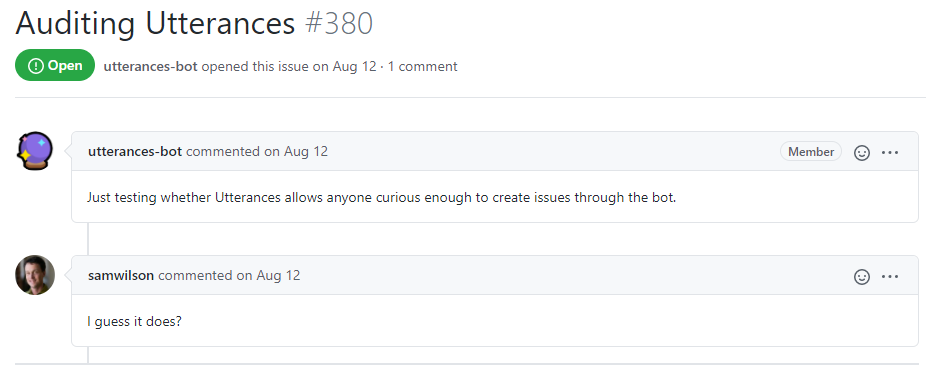
<blockquote>
  <p>&lt;imagine a cool picture of it here <sup>because <sup>i <sup>can’t<sup>find<sup>one🥺</sup></sup></sup></sup></sup>&gt;</p>
</blockquote>

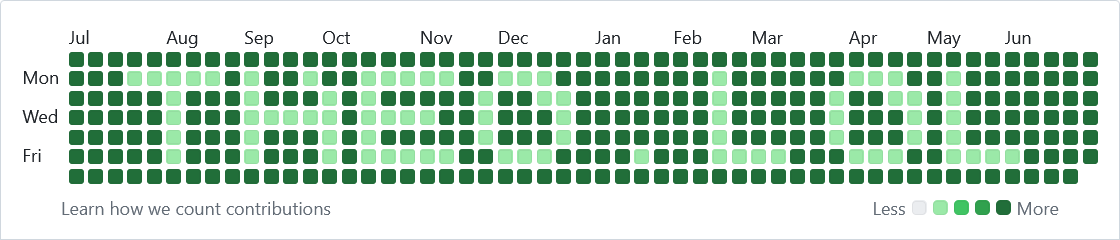
<p>Since my contribution graph usually looks like this:</p>

<p><img src="/assets/img/github-paint/theos-usual-contribution-graph.png" alt="a picture of a pretty empty contribution graph" />
<em>&lt; tumbleweed emoji &gt;</em></p>

<p>...I’ve always had it in the back of my mind as something I’d like to take a stab at. Primarily for the sake of solving an interesting problem, but also to mess with recruiters who seem to believe contribution activity strongly correlates with programming ability (<em>said with chip on shoulder as someone required to use a separate GitHub account for work</em>).</p>

<p>Since taking a burnout-induced leave-of-absence, I’ve had some time to explore the problem, which has led to the creation of...</p>

<h2 id="tbrockmangithub-paint"><a href="https://github.com/tbrockman/github-paint"><code class="language-plaintext highlighter-rouge">tbrockman/github-paint</code></a></h2>

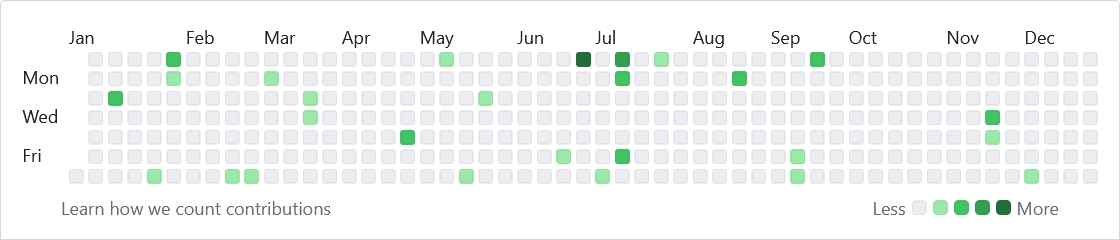
<p>a GitHub Action which--given a string, a GitHub API token, and any optional parameters--performs the necessary calculations to create the right number of commits on the right dates to render something like the following in your GitHub profile:</p>

<p><img src="/assets/img/github-paint/example.png" alt="the text &quot;theo.lol&quot; written in tbrockman's contribution graph" /></p>

<p>Since it’s a GitHub Action, you can also configure it to run periodically such that your contribution graph always shows the text in the same position as time goes on.</p>

<h2 id="how-it-works">how it works</h2>

<p>The whole thing is a Python <a href="https://typer.tiangolo.com/">Typer-CLI</a> that primarily makes calls to <a href="https://cli.github.com/"><code class="language-plaintext highlighter-rouge">gh</code></a> and <a href="https://git-scm.com/"><code class="language-plaintext highlighter-rouge">git</code></a>, orchestrating the following:</p>

<ol>
  <li>First, we create a pixel grid where <code class="language-plaintext highlighter-rouge">width = number_of_weeks_in_timeframe</code> and <code class="language-plaintext highlighter-rouge">height = 7</code>.</li>
  <li>Then, we take our (potentially repeated) text, determine its size given the font (and the dimensions of each glyph used), and position it within the window (given specified padding and alignment).</li>
  <li>Then, we map each pixel in the window to its corresponding date.</li>
  <li>Then, retrieving the users existing contribution activity for each date, we determine (given <a href="https://stackoverflow.com/a/78686095/23271846">some secret sauce</a> on how commit activity correlates to pixel color) how many additional commits we need on that day.
    <ul>
      <li>If we actually need <em>fewer</em>, we can handle this by adding more commits to <em>other</em> days--assuming our target isn’t zero commits (that would be pretty hard to do).</li>
    </ul>
  </li>
  <li>Then, after initializing a fresh <code class="language-plaintext highlighter-rouge">git</code> repository, for each day (in the appropriate chronological order--though this doesn’t seem to matter much to GitHub), we forge the necessary number of commits on each date (since <code class="language-plaintext highlighter-rouge">git</code> allows setting arbitrary commit timestamps).</li>
  <li>Finally, push the new repository and history (deleting the old one if it exists), and wait a bit for GitHub to render our shiny new contribution graph.</li>
</ol>

<p>So far, it seems to work pretty well, but it’s not <em>super</em> battle-tested. if you run into issues feel free to create a pull request in the repository: <a href="https://github.com/tbrockman/github-paint">https://github.com/tbrockman/github-paint</a>.</p>

<p>✌️</p>]]></content><author><name>Theodore Brockman</name></author><category term="project" /><category term="github" /><category term="action" /><category term="python" /><category term="cli" /><summary type="html"><![CDATA[A GitHub Action to help your GitHub profile *really* stand out.]]></summary></entry><entry><title type="html">message passing and `MAIN` world content scripts ✉️</title><link href="https://theo.lol/chrome/extensions/content-scripts/message-passing/2024/01/29/content-script-messaging.html" rel="alternate" type="text/html" title="message passing and `MAIN` world content scripts ✉️" /><published>2024-01-29T13:32:00+00:00</published><updated>2024-01-29T13:32:00+00:00</updated><id>https://theo.lol/chrome/extensions/content-scripts/message-passing/2024/01/29/content-script-messaging</id><content type="html" xml:base="https://theo.lol/chrome/extensions/content-scripts/message-passing/2024/01/29/content-script-messaging.html"><![CDATA[<p>Let’s say that maybe you’re a little bit of an anarchist, and you want to write Javascript that runs on <a href="https://reddit.com">reddit.com</a> to mangle the tracking data their client sends while you’re browsing (but not block it completely).</p>

<p>You would need the ability to intercept the request before it happens, modify the request body, and then send it on its way.</p>

<p>There’s a few ways you could go about doing this, but one of the more straight-forward ones is by using a <a href="https://developer.chrome.com/docs/extensions/develop/concepts/content-scripts">content script</a>.</p>

<h2 id="content-scripts">content scripts</h2>

<p>Depending on the browser (Firefox is a bit <a href="https://developer.mozilla.org/en-US/docs/Mozilla/Add-ons/WebExtensions/Sharing_objects_with_page_scripts">more security conscious</a>), content scripts can directly interact with existing webpage Javascript objects (with the converse being true as well), and modify them as desired.</p>

<p>This means that you can write something like the following:</p>

<p><a href="https://github.com/tbrockman/examples/blob/main/main-world-content-script-message-passing/content-script.js"><code class="language-plaintext highlighter-rouge">content-script.js</code></a></p>
<div class="language-javascript highlighter-rouge"><div class="highlight"><pre class="highlight"><code><span class="kd">let</span> <span class="nx">proxied</span> <span class="o">=</span> <span class="nx">fetch</span><span class="p">;</span>
<span class="nx">fetch</span> <span class="o">=</span> <span class="kd">function</span> <span class="p">(</span><span class="nx">resource</span><span class="p">,</span> <span class="nx">options</span><span class="p">)</span> <span class="p">{</span>
    <span class="nx">console</span><span class="p">.</span><span class="nx">log</span><span class="p">(</span><span class="dl">'</span><span class="s1">in proxied fetch handler</span><span class="dl">'</span><span class="p">,</span> <span class="nx">resource</span><span class="p">)</span>

    <span class="k">if</span> <span class="p">(</span><span class="nx">resource</span><span class="p">.</span><span class="nx">includes</span><span class="p">(</span><span class="dl">'</span><span class="s1">/svc/shreddit/events</span><span class="dl">'</span><span class="p">))</span> <span class="p">{</span>
        <span class="c1">// assuming the request body is JSON</span>
        <span class="kd">let</span> <span class="nx">body</span> <span class="o">=</span> <span class="nx">JSON</span><span class="p">.</span><span class="nx">parse</span><span class="p">(</span><span class="nx">options</span><span class="p">.</span><span class="nx">body</span><span class="p">);</span>
        <span class="nx">console</span><span class="p">.</span><span class="nx">log</span><span class="p">(</span><span class="dl">'</span><span class="s1">original body</span><span class="dl">'</span><span class="p">,</span> <span class="nx">body</span><span class="p">)</span>
        <span class="c1">// mangle the tracking data</span>
        <span class="nx">body</span><span class="p">[</span><span class="dl">'</span><span class="s1">info</span><span class="dl">'</span><span class="p">]</span> <span class="o">=</span> <span class="nx">mangle</span><span class="p">(</span><span class="nx">body</span><span class="p">[</span><span class="dl">'</span><span class="s1">info</span><span class="dl">'</span><span class="p">]);</span>
        <span class="nx">console</span><span class="p">.</span><span class="nx">log</span><span class="p">(</span><span class="dl">'</span><span class="s1">mangled body</span><span class="dl">'</span><span class="p">,</span> <span class="nx">body</span><span class="p">)</span>
        <span class="c1">// stringify the body again</span>
        <span class="nx">options</span><span class="p">.</span><span class="nx">body</span> <span class="o">=</span> <span class="nx">JSON</span><span class="p">.</span><span class="nx">stringify</span><span class="p">(</span><span class="nx">body</span><span class="p">);</span>
    <span class="p">}</span>
    <span class="k">return</span> <span class="nx">proxied</span><span class="p">(</span><span class="nx">resource</span><span class="p">,</span> <span class="nx">options</span><span class="p">);</span>
<span class="p">}</span>
</code></pre></div></div>

<p>Where <code class="language-plaintext highlighter-rouge">mangle</code> could be a function like:</p>
<div class="language-javascript highlighter-rouge"><div class="highlight"><pre class="highlight"><code><span class="kd">let</span> <span class="nx">strings</span> <span class="o">=</span> <span class="p">[</span><span class="dl">'</span><span class="s1">never</span><span class="dl">'</span><span class="p">,</span> <span class="dl">'</span><span class="s1">gonna</span><span class="dl">'</span><span class="p">,</span> <span class="dl">'</span><span class="s1">give</span><span class="dl">'</span><span class="p">,</span> <span class="dl">'</span><span class="s1">you</span><span class="dl">'</span><span class="p">,</span> <span class="dl">'</span><span class="s1">up</span><span class="dl">'</span><span class="p">,</span> <span class="dl">'</span><span class="s1">let</span><span class="dl">'</span><span class="p">,</span> <span class="dl">'</span><span class="s1">down</span><span class="dl">'</span><span class="p">,</span> <span class="dl">'</span><span class="s1">run</span><span class="dl">'</span><span class="p">,</span> <span class="dl">'</span><span class="s1">around</span><span class="dl">'</span><span class="p">,</span> 
               <span class="dl">'</span><span class="s1">and</span><span class="dl">'</span><span class="p">,</span> <span class="dl">'</span><span class="s1">desert</span><span class="dl">'</span><span class="p">,</span> <span class="dl">'</span><span class="s1">make</span><span class="dl">'</span><span class="p">,</span> <span class="dl">'</span><span class="s1">cry</span><span class="dl">'</span><span class="p">,</span> <span class="dl">'</span><span class="s1">say</span><span class="dl">'</span><span class="p">,</span> <span class="dl">'</span><span class="s1">goodye</span><span class="dl">'</span><span class="p">,</span> <span class="dl">'</span><span class="s1">tell</span><span class="dl">'</span><span class="p">,</span> <span class="dl">'</span><span class="s1">lie</span><span class="dl">'</span><span class="p">,</span> <span class="dl">'</span><span class="s1">hurt</span><span class="dl">'</span><span class="p">]</span>
<span class="kd">let</span> <span class="nx">ints</span> <span class="o">=</span> <span class="p">[</span><span class="mi">0</span><span class="p">,</span> <span class="mi">420</span><span class="p">,</span> <span class="mi">69</span><span class="p">,</span> <span class="mi">8008135</span><span class="p">,</span> <span class="mi">666</span><span class="p">]</span>

<span class="kd">function</span> <span class="nx">mangle</span><span class="p">(</span><span class="nx">data</span><span class="p">)</span> <span class="p">{</span>

    <span class="k">if</span> <span class="p">(</span><span class="nx">data</span> <span class="o">===</span> <span class="kc">null</span> <span class="o">||</span> <span class="nx">data</span> <span class="o">===</span> <span class="kc">undefined</span><span class="p">)</span> <span class="p">{</span>
        <span class="k">return</span> <span class="nx">data</span>
    <span class="p">}</span>

    <span class="k">if</span> <span class="p">(</span><span class="nb">Array</span><span class="p">.</span><span class="nx">isArray</span><span class="p">(</span><span class="nx">data</span><span class="p">))</span> <span class="p">{</span>
        <span class="nx">data</span> <span class="o">=</span> <span class="nx">data</span><span class="p">.</span><span class="nx">map</span><span class="p">(</span><span class="nx">d</span> <span class="o">=&gt;</span> <span class="nx">mangle</span><span class="p">(</span><span class="nx">d</span><span class="p">));</span>
    <span class="p">}</span> <span class="k">else</span> <span class="k">if</span> <span class="p">(</span><span class="k">typeof</span> <span class="nx">data</span> <span class="o">===</span> <span class="dl">'</span><span class="s1">object</span><span class="dl">'</span><span class="p">)</span> <span class="p">{</span>
        <span class="nb">Object</span><span class="p">.</span><span class="nx">keys</span><span class="p">(</span><span class="nx">data</span><span class="p">).</span><span class="nx">forEach</span><span class="p">(</span><span class="nx">key</span> <span class="o">=&gt;</span> <span class="p">{</span>
            <span class="nx">data</span><span class="p">[</span><span class="nx">key</span><span class="p">]</span> <span class="o">=</span> <span class="nx">mangle</span><span class="p">(</span><span class="nx">data</span><span class="p">[</span><span class="nx">key</span><span class="p">]);</span>
        <span class="p">});</span>
    <span class="p">}</span>
    <span class="k">else</span> <span class="k">if</span> <span class="p">(</span><span class="k">typeof</span> <span class="nx">data</span> <span class="o">===</span> <span class="dl">'</span><span class="s1">string</span><span class="dl">'</span><span class="p">)</span> <span class="p">{</span>
        <span class="nx">data</span> <span class="o">=</span> <span class="nx">strings</span><span class="p">[</span><span class="nb">Math</span><span class="p">.</span><span class="nx">floor</span><span class="p">(</span><span class="nb">Math</span><span class="p">.</span><span class="nx">random</span><span class="p">()</span> <span class="o">*</span> <span class="nx">strings</span><span class="p">.</span><span class="nx">length</span><span class="p">)];</span>
    <span class="p">}</span> <span class="k">else</span> <span class="k">if</span> <span class="p">(</span><span class="k">typeof</span> <span class="nx">data</span> <span class="o">===</span> <span class="dl">'</span><span class="s1">number</span><span class="dl">'</span><span class="p">)</span> <span class="p">{</span>
        <span class="nx">data</span> <span class="o">=</span> <span class="nx">ints</span><span class="p">[</span><span class="nb">Math</span><span class="p">.</span><span class="nx">floor</span><span class="p">(</span><span class="nb">Math</span><span class="p">.</span><span class="nx">random</span><span class="p">()</span> <span class="o">*</span> <span class="nx">ints</span><span class="p">.</span><span class="nx">length</span><span class="p">)];</span>
    <span class="p">}</span> <span class="k">else</span> <span class="k">if</span> <span class="p">(</span><span class="k">typeof</span> <span class="nx">data</span> <span class="o">===</span> <span class="dl">'</span><span class="s1">boolean</span><span class="dl">'</span><span class="p">)</span> <span class="p">{</span>
        <span class="nx">data</span> <span class="o">=</span> <span class="nb">Math</span><span class="p">.</span><span class="nx">random</span><span class="p">()</span> <span class="o">&lt;</span> <span class="mf">0.5</span><span class="p">;</span>
    <span class="p">}</span>
    <span class="k">return</span> <span class="nx">data</span><span class="p">;</span>
<span class="p">}</span>
</code></pre></div></div>

<p>And then, assuming you’ve set up your <code class="language-plaintext highlighter-rouge">manifest.json</code> correctly:</p>

<p><a href="https://github.com/tbrockman/examples/blob/main/main-world-content-script-message-passing/manifest.json"><code class="language-plaintext highlighter-rouge">manifest.json</code></a></p>
<div class="language-javascript highlighter-rouge"><div class="highlight"><pre class="highlight"><code><span class="p">{</span>
    <span class="dl">"</span><span class="s2">name</span><span class="dl">"</span><span class="p">:</span> <span class="dl">"</span><span class="s2">Reddit tracking data mangler</span><span class="dl">"</span><span class="p">,</span>
    <span class="dl">"</span><span class="s2">version</span><span class="dl">"</span><span class="p">:</span> <span class="dl">"</span><span class="s2">1.0</span><span class="dl">"</span><span class="p">,</span>
    <span class="dl">"</span><span class="s2">manifest_version</span><span class="dl">"</span><span class="p">:</span> <span class="mi">3</span><span class="p">,</span>
    <span class="dl">"</span><span class="s2">background</span><span class="dl">"</span><span class="p">:</span> <span class="p">{</span>
        <span class="dl">"</span><span class="s2">service_worker</span><span class="dl">"</span><span class="p">:</span> <span class="dl">"</span><span class="s2">background.js</span><span class="dl">"</span>
    <span class="p">},</span>
    <span class="dl">"</span><span class="s2">host_permissions</span><span class="dl">"</span><span class="p">:</span> <span class="p">[</span>
        <span class="dl">"</span><span class="s2">https://*.reddit.com/*</span><span class="dl">"</span>
    <span class="p">],</span>
    <span class="dl">"</span><span class="s2">permissions</span><span class="dl">"</span><span class="p">:</span> <span class="p">[</span>
        <span class="dl">"</span><span class="s2">tabs</span><span class="dl">"</span><span class="p">,</span>
        <span class="dl">"</span><span class="s2">scripting</span><span class="dl">"</span><span class="p">,</span>
        <span class="dl">"</span><span class="s2">activeTab</span><span class="dl">"</span>
    <span class="p">]</span>
<span class="p">}</span>
</code></pre></div></div>

<p>You can inject it on every page load:</p>

<p><a href="https://github.com/tbrockman/examples/blob/main/main-world-content-script-message-passing/background.js"><code class="language-plaintext highlighter-rouge">background.js</code></a></p>
<div class="language-javascript highlighter-rouge"><div class="highlight"><pre class="highlight"><code><span class="nx">chrome</span><span class="p">.</span><span class="nx">tabs</span><span class="p">.</span><span class="nx">onUpdated</span><span class="p">.</span><span class="nx">addListener</span><span class="p">(</span><span class="kd">function</span> <span class="p">(</span><span class="nx">tabId</span><span class="p">,</span> <span class="nx">changeInfo</span><span class="p">,</span> <span class="nx">tab</span><span class="p">)</span> <span class="p">{</span>
    <span class="k">if</span> <span class="p">(</span><span class="nx">changeInfo</span><span class="p">.</span><span class="nx">status</span> <span class="o">==</span> <span class="dl">'</span><span class="s1">complete</span><span class="dl">'</span><span class="p">)</span> <span class="p">{</span>
        <span class="nx">chrome</span><span class="p">.</span><span class="nx">scripting</span><span class="p">.</span><span class="nx">executeScript</span><span class="p">({</span>
            <span class="na">target</span><span class="p">:</span> <span class="p">{</span> <span class="nx">tabId</span><span class="p">,</span> <span class="na">allFrames</span><span class="p">:</span> <span class="kc">true</span> <span class="p">},</span>
            <span class="na">files</span><span class="p">:</span> <span class="p">[</span><span class="dl">'</span><span class="s1">content-script.js</span><span class="dl">'</span><span class="p">],</span>
            <span class="na">injectImmediately</span><span class="p">:</span> <span class="kc">true</span><span class="p">,</span>
            <span class="na">world</span><span class="p">:</span> <span class="dl">'</span><span class="s1">MAIN</span><span class="dl">'</span>
        <span class="p">}).</span><span class="nx">then</span><span class="p">(()</span> <span class="o">=&gt;</span> <span class="p">{</span>
            <span class="nx">console</span><span class="p">.</span><span class="nx">log</span><span class="p">(</span><span class="dl">'</span><span class="s1">content script injected</span><span class="dl">'</span><span class="p">);</span>
        <span class="p">});</span>
    <span class="p">}</span>
<span class="p">});</span>
</code></pre></div></div>

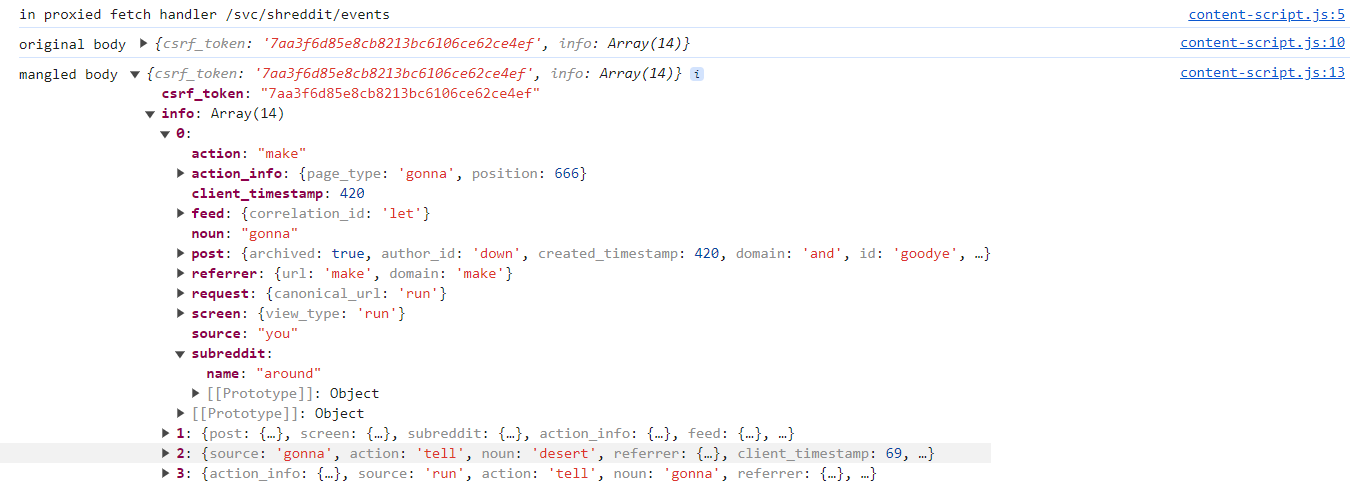
<p>And then marvel at your work:</p>

<p><a href="/assets/img/main-world-content-scripts-with-message-passing/mangled-request-console-log.png"><img src="/assets/img/main-world-content-scripts-with-message-passing/mangled-request-console-log.png" alt="console log of reddit tracking data mangler in action" /></a></p>

<p>Pretty neat, right? But what if we were feeling bad and wanted to extend our little application so that we could turn it on and off when we didn’t care about being tracked? We could add a button to the popup that would toggle the content script, but how would we communicate to the content script in the first place?</p>

<p>This is where <a href="https://developer.chrome.com/docs/extensions/develop/concepts/messaging">message passing</a> comes in.</p>

<h2 id="message-passing">message passing</h2>

<p>If you’ve worked in browser extensions before, you’re likely already familiar with sending messages between the background script and the popup, maybe even communicating with content scripts injected into the default <a href="https://developer.chrome.com/docs/extensions/reference/api/scripting#type-ExecutionWorld"><code class="language-plaintext highlighter-rouge">ISOLATED</code></a> world, but it turns out that once your code exists in the same realm as other webpage Javascript, you can’t send messages as easily.</p>

<p>To illustrate this, let’s start off by adding a button to our popup that will allow us to toggle our content script:</p>

<div class="language-html highlighter-rouge"><div class="highlight"><pre class="highlight"><code><span class="cp">&lt;!DOCTYPE html&gt;</span>
<span class="nt">&lt;html&gt;</span>
  <span class="nt">&lt;head&gt;</span>
    <span class="nt">&lt;title&gt;</span>Reddit tracking data mangler<span class="nt">&lt;/title&gt;</span>
    <span class="nt">&lt;script </span><span class="na">src=</span><span class="s">"popup.js"</span><span class="nt">&gt;&lt;/script&gt;</span>
  <span class="nt">&lt;/head&gt;</span>
  <span class="nt">&lt;body&gt;</span>
    <span class="nt">&lt;button</span> <span class="na">id=</span><span class="s">"toggle"</span><span class="nt">&gt;</span>Toggle<span class="nt">&lt;/button&gt;</span>
  <span class="nt">&lt;/body&gt;</span>
<span class="nt">&lt;/html&gt;</span>
</code></pre></div></div>

<p>We’ll need a listener for the button click to send a message to the our content script:</p>

<p><a href="https://github.com/tbrockman/examples/blob/main/main-world-content-script-message-passing/popup.js"><code class="language-plaintext highlighter-rouge">popup.js</code></a></p>
<div class="language-javascript highlighter-rouge"><div class="highlight"><pre class="highlight"><code><span class="nb">document</span><span class="p">.</span><span class="nx">addEventListener</span><span class="p">(</span><span class="dl">'</span><span class="s1">DOMContentLoaded</span><span class="dl">'</span><span class="p">,</span> <span class="kd">function</span><span class="p">()</span> <span class="p">{</span>
    <span class="kd">let</span> <span class="nx">toggle</span> <span class="o">=</span> <span class="nb">document</span><span class="p">.</span><span class="nx">getElementById</span><span class="p">(</span><span class="dl">'</span><span class="s1">toggle</span><span class="dl">'</span><span class="p">);</span>
    <span class="nx">toggle</span><span class="p">.</span><span class="nx">addEventListener</span><span class="p">(</span><span class="dl">'</span><span class="s1">click</span><span class="dl">'</span><span class="p">,</span> <span class="k">async</span> <span class="p">()</span> <span class="o">=&gt;</span> <span class="p">{</span>
        <span class="k">await</span> <span class="nx">chrome</span><span class="p">.</span><span class="nx">runtime</span><span class="p">.</span><span class="nx">sendMessage</span><span class="p">(</span><span class="dl">'</span><span class="s1">toggle</span><span class="dl">'</span><span class="p">)</span>
    <span class="p">});</span>
<span class="p">});</span>
</code></pre></div></div>

<p>Then we’ll add a listener for the message in our content script (and modify our <code class="language-plaintext highlighter-rouge">fetch</code> handler to consider the toggle):</p>

<p><a href="https://github.com/tbrockman/examples/blob/main/main-world-content-script-message-passing/content-script.js"><code class="language-plaintext highlighter-rouge">content-script.js</code></a></p>
<div class="language-javascript highlighter-rouge"><div class="highlight"><pre class="highlight"><code><span class="kd">let</span> <span class="nx">enabled</span> <span class="o">=</span> <span class="kc">true</span><span class="p">;</span>

<span class="nx">chrome</span><span class="p">.</span><span class="nx">runtime</span><span class="p">.</span><span class="nx">onMessage</span><span class="p">.</span><span class="nx">addListener</span><span class="p">((</span><span class="nx">message</span><span class="p">,</span> <span class="nx">sender</span><span class="p">,</span> <span class="nx">sendResponse</span><span class="p">)</span> <span class="o">=&gt;</span> <span class="p">{</span>
    <span class="nx">console</span><span class="p">.</span><span class="nx">log</span><span class="p">(</span><span class="dl">'</span><span class="s1">message received</span><span class="dl">'</span><span class="p">,</span> <span class="nx">message</span><span class="p">);</span>
    <span class="k">if</span> <span class="p">(</span><span class="nx">message</span> <span class="o">===</span> <span class="dl">'</span><span class="s1">toggle</span><span class="dl">'</span><span class="p">)</span> <span class="p">{</span>
        <span class="nx">console</span><span class="p">.</span><span class="nx">log</span><span class="p">(</span><span class="dl">'</span><span class="s1">toggling</span><span class="dl">'</span><span class="p">);</span>
        <span class="nx">enabled</span> <span class="o">=</span> <span class="o">!</span><span class="nx">enabled</span><span class="p">;</span>
    <span class="p">}</span>
<span class="p">});</span>

<span class="nx">fetch</span> <span class="o">=</span> <span class="kd">function</span> <span class="p">(</span><span class="nx">resource</span><span class="p">,</span> <span class="nx">options</span><span class="p">)</span> <span class="p">{</span>
    <span class="nx">console</span><span class="p">.</span><span class="nx">log</span><span class="p">(</span><span class="dl">'</span><span class="s1">in proxied fetch handler</span><span class="dl">'</span><span class="p">,</span> <span class="nx">resource</span><span class="p">)</span>
    <span class="k">if</span> <span class="p">(</span><span class="nx">resource</span><span class="p">.</span><span class="nx">includes</span><span class="p">(</span><span class="dl">'</span><span class="s1">/svc/shreddit/events</span><span class="dl">'</span><span class="p">)</span> <span class="o">&amp;&amp;</span> <span class="nx">enabled</span><span class="p">)</span> <span class="p">{</span>
        <span class="c1">// assuming the request body is JSON</span>
        <span class="kd">let</span> <span class="nx">body</span> <span class="o">=</span> <span class="nx">JSON</span><span class="p">.</span><span class="nx">parse</span><span class="p">(</span><span class="nx">options</span><span class="p">.</span><span class="nx">body</span><span class="p">);</span>
        <span class="c1">// mangle the tracking data</span>
        <span class="nx">console</span><span class="p">.</span><span class="nx">log</span><span class="p">(</span><span class="dl">'</span><span class="s1">original body</span><span class="dl">'</span><span class="p">,</span> <span class="nx">body</span><span class="p">)</span>
        <span class="nx">body</span><span class="p">[</span><span class="dl">'</span><span class="s1">info</span><span class="dl">'</span><span class="p">]</span> <span class="o">=</span> <span class="nx">mangle</span><span class="p">(</span><span class="nx">body</span><span class="p">[</span><span class="dl">'</span><span class="s1">info</span><span class="dl">'</span><span class="p">]);</span>
        <span class="c1">// stringify the body again</span>
        <span class="nx">console</span><span class="p">.</span><span class="nx">log</span><span class="p">(</span><span class="dl">'</span><span class="s1">mangled body</span><span class="dl">'</span><span class="p">,</span> <span class="nx">body</span><span class="p">)</span>
        <span class="nx">options</span><span class="p">.</span><span class="nx">body</span> <span class="o">=</span> <span class="nx">JSON</span><span class="p">.</span><span class="nx">stringify</span><span class="p">(</span><span class="nx">body</span><span class="p">);</span>
    <span class="p">}</span>
    <span class="k">return</span> <span class="nx">proxied</span><span class="p">(</span><span class="nx">resource</span><span class="p">,</span> <span class="nx">options</span><span class="p">);</span>
<span class="p">}</span>
</code></pre></div></div>

<p>And add our new popup to our manifest:</p>

<p><a href="https://github.com/tbrockman/examples/blob/main/main-world-content-script-message-passing/manifest.json"><code class="language-plaintext highlighter-rouge">manifest.json</code></a></p>
<div class="language-javascript highlighter-rouge"><div class="highlight"><pre class="highlight"><code><span class="p">{</span>
    <span class="dl">"</span><span class="s2">action</span><span class="dl">"</span><span class="p">:</span> <span class="p">{</span>
        <span class="dl">"</span><span class="s2">default_title</span><span class="dl">"</span><span class="p">:</span> <span class="dl">"</span><span class="s2">Reddit tracking data mangler</span><span class="dl">"</span><span class="p">,</span>
        <span class="dl">"</span><span class="s2">default_popup</span><span class="dl">"</span><span class="p">:</span> <span class="dl">"</span><span class="s2">popup.html</span><span class="dl">"</span>
    <span class="p">}</span>
<span class="p">}</span>
</code></pre></div></div>

<p>Then we load up our extension and…</p>

<p><a href="/assets/img/main-world-content-scripts-with-message-passing/chrome-runtime-onmesasage-undefined.png"><img src="/assets/img/main-world-content-scripts-with-message-passing/chrome-runtime-onmesasage-undefined.png" alt="Uncaught TypeError: Cannot read property 'addListener' of undefined" /></a>
<em>oh poop.</em></p>

<p>This is because the content script only has access to a limited subset of the <code class="language-plaintext highlighter-rouge">chrome.runtime</code> API as a result of being injected into the <code class="language-plaintext highlighter-rouge">MAIN</code> world. While at first frustrating, if you stop to think about it, it makes sense: Content scripts injected into the <code class="language-plaintext highlighter-rouge">MAIN</code> world are now running in the same context as the webpage, and the webpage (or other content scripts) can’t be trusted. Naturally the browser requires a few more precautions to help make sure you understand <a href="https://developer.chrome.com/docs/extensions/develop/concepts/messaging#content-scripts-are-less-trustworthy">the full implications of what you’re doing</a>.</p>

<h2 id="externally-connectable">externally connectable</h2>

<p>Instead, we need to treat our own content script as an <a href="https://developer.chrome.com/docs/extensions/develop/concepts/messaging#external-webpage"><em>external webpage</em></a>, since it can no longer be considered a trusted part of the extension. This means that we need to allow connections from external webpages in our <code class="language-plaintext highlighter-rouge">manifest.json</code>:</p>

<p><a href="https://github.com/tbrockman/examples/blob/main/main-world-content-script-message-passing/manifest.json"><code class="language-plaintext highlighter-rouge">manifest.json</code></a></p>
<div class="language-javascript highlighter-rouge"><div class="highlight"><pre class="highlight"><code><span class="p">{</span>
    <span class="dl">"</span><span class="s2">externally_connectable</span><span class="dl">"</span><span class="p">:</span> <span class="p">{</span>
        <span class="dl">"</span><span class="s2">matches</span><span class="dl">"</span><span class="p">:</span> <span class="p">[</span><span class="dl">"</span><span class="s2">https://reddit.com/*</span><span class="dl">"</span><span class="p">]</span>
    <span class="p">}</span>
<span class="p">}</span>
</code></pre></div></div>

<p>Then, we establish a connection from our content script to our <em>background script</em>:</p>

<p><a href="https://github.com/tbrockman/examples/blob/main/main-world-content-script-message-passing/content-script.js"><code class="language-plaintext highlighter-rouge">content-script.js</code></a></p>
<div class="language-javascript highlighter-rouge"><div class="highlight"><pre class="highlight"><code><span class="c1">// chrome.runtime.id is not available in `MAIN` world content scripts, so we need to hardcode our extension ID</span>
<span class="c1">// you can find your extension ID in `chrome://extensions/`, but if you don't want to hardcode this string, skip ahead to the bonus section.</span>
<span class="kd">let</span> <span class="nx">port</span> <span class="o">=</span> <span class="nx">chrome</span><span class="p">.</span><span class="nx">runtime</span><span class="p">.</span><span class="nx">connect</span><span class="p">(</span><span class="dl">'</span><span class="s1">blfjpfhginhogjljcbffeadcafbcmldg</span><span class="dl">'</span><span class="p">);</span> 

<span class="nx">port</span><span class="p">.</span><span class="nx">onMessage</span><span class="p">.</span><span class="nx">addListener</span><span class="p">((</span><span class="nx">message</span><span class="p">)</span> <span class="o">=&gt;</span> <span class="p">{</span>
    <span class="nx">console</span><span class="p">.</span><span class="nx">log</span><span class="p">(</span><span class="dl">'</span><span class="s1">message received</span><span class="dl">'</span><span class="p">,</span> <span class="nx">message</span><span class="p">);</span>
    <span class="k">if</span> <span class="p">(</span><span class="nx">message</span> <span class="o">===</span> <span class="dl">'</span><span class="s1">toggle</span><span class="dl">'</span><span class="p">)</span> <span class="p">{</span>
        <span class="nx">console</span><span class="p">.</span><span class="nx">log</span><span class="p">(</span><span class="dl">'</span><span class="s1">toggling</span><span class="dl">'</span><span class="p">);</span>
        <span class="nx">toggled</span> <span class="o">=</span> <span class="o">!</span><span class="nx">toggled</span><span class="p">;</span>
    <span class="p">}</span>
<span class="p">});</span>
</code></pre></div></div>

<p>Then, create the corresponding background script listener for <a href="https://developer.chrome.com/docs/extensions/reference/api/runtime#event-onConnectExternal"><code class="language-plaintext highlighter-rouge">onConnectExternal</code></a>:</p>

<p><a href="https://github.com/tbrockman/examples/blob/main/main-world-content-script-message-passing/background.js"><code class="language-plaintext highlighter-rouge">background.js</code></a></p>
<div class="language-javascript highlighter-rouge"><div class="highlight"><pre class="highlight"><code><span class="kd">let</span> <span class="nx">ports</span> <span class="o">=</span> <span class="p">[];</span> <span class="c1">// keep track of all our connections for messaging</span>

<span class="nx">chrome</span><span class="p">.</span><span class="nx">runtime</span><span class="p">.</span><span class="nx">onConnectExternal</span><span class="p">.</span><span class="nx">addListener</span><span class="p">((</span><span class="nx">port</span><span class="p">)</span> <span class="o">=&gt;</span> <span class="p">{</span>
    <span class="nx">console</span><span class="p">.</span><span class="nx">log</span><span class="p">(</span><span class="dl">'</span><span class="s1">external connection received</span><span class="dl">'</span><span class="p">,</span> <span class="nx">port</span><span class="p">);</span>

    <span class="nx">ports</span><span class="p">.</span><span class="nx">push</span><span class="p">(</span><span class="nx">port</span><span class="p">);</span>
<span class="p">});</span>
</code></pre></div></div>

<p>As well as adding a listener for relaying the <code class="language-plaintext highlighter-rouge">toggle</code> (and any other) message from our popup:</p>

<div class="language-javascript highlighter-rouge"><div class="highlight"><pre class="highlight"><code><span class="nx">chrome</span><span class="p">.</span><span class="nx">runtime</span><span class="p">.</span><span class="nx">onMessage</span><span class="p">.</span><span class="nx">addListener</span><span class="p">(</span>
    <span class="kd">function</span> <span class="p">(</span><span class="nx">request</span><span class="p">,</span> <span class="nx">sender</span><span class="p">,</span> <span class="nx">sendResponse</span><span class="p">)</span> <span class="p">{</span>
        <span class="nx">ports</span><span class="p">.</span><span class="nx">forEach</span><span class="p">(</span><span class="nx">port</span> <span class="o">=&gt;</span> <span class="p">{</span>
            <span class="nx">port</span><span class="p">.</span><span class="nx">postMessage</span><span class="p">(</span><span class="nx">request</span><span class="p">);</span>
        <span class="p">});</span>
    <span class="p">}</span>
<span class="p">);</span>
</code></pre></div></div>

<p>And now we can toggle our content script from our popup!</p>

<p><a href="/assets/img/main-world-content-scripts-with-message-passing/toggled-message-console-log.png"><img src="/assets/img/main-world-content-scripts-with-message-passing/toggled-message-console-log.png" alt="console log of reddit tracking data mangler in action" /></a>
<em>it’s toggled</em></p>

<p>Note that after making your extension externally connectable, you should be <em>very</em> careful about how you process information you receive, and what information you send, to untrusted external connections–even <em>if</em> the recipient is trusted, there’s no guarantee other code won’t be spying.</p>

<h2 id="bonus-using-func">bonus: using <a href="https://developer.chrome.com/docs/extensions/reference/api/scripting#method-ScriptInjection-func"><code class="language-plaintext highlighter-rouge">func</code></a></h2>

<p>You may have noticed earlier that we had to hardcode our extension ID in our content script, which isn’t very portable (it’ll be different each time someone develops locally <em>and</em> when it’s published in production) and will need to be manually updated. You may find other reasons that you want to provide context directly to your content script from your background script.</p>

<p>It turns out that this can be accomplished using the <a href="https://developer.chrome.com/docs/extensions/reference/api/scripting#method-ScriptInjection-func"><code class="language-plaintext highlighter-rouge">func</code></a> and <a href="https://developer.chrome.com/docs/extensions/reference/api/scripting#property-ScriptInjection-args"><code class="language-plaintext highlighter-rouge">args</code></a> parameters of <a href="https://developer.chrome.com/docs/extensions/reference/api/scripting#method-executeScript"><code class="language-plaintext highlighter-rouge">chrome.scripting.executeScript</code></a>.</p>

<h3 id="caveats">Caveats:</h3>
<ul>
  <li><code class="language-plaintext highlighter-rouge">func</code> will be serialized and then deserialized for injection, so it will lose any references to the original function’s scope (i.e, it must contain all the code it needs to execute within itself)</li>
  <li><code class="language-plaintext highlighter-rouge">args</code> must all be <code class="language-plaintext highlighter-rouge">JSON</code>-serializable</li>
</ul>

<p>So, as an example, we would re-write <code class="language-plaintext highlighter-rouge">content-script.js</code> to be:</p>

<p><a href="https://github.com/tbrockman/examples/blob/main/main-world-content-script-message-passing/content-script.js"><code class="language-plaintext highlighter-rouge">content-script.js</code></a></p>
<div class="language-javascript highlighter-rouge"><div class="highlight"><pre class="highlight"><code><span class="kd">function</span> <span class="nx">injectContentScript</span><span class="p">(</span><span class="nx">extensionId</span><span class="p">)</span> <span class="p">{</span>
    <span class="nx">console</span><span class="p">.</span><span class="nx">log</span><span class="p">(</span><span class="dl">'</span><span class="s1">injected content script with id: </span><span class="dl">'</span><span class="p">,</span> <span class="nx">extensionId</span><span class="p">)</span>

    <span class="kd">let</span> <span class="nx">enabled</span> <span class="o">=</span> <span class="kc">true</span><span class="p">;</span>
    <span class="kd">let</span> <span class="nx">port</span> <span class="o">=</span> <span class="nx">chrome</span><span class="p">.</span><span class="nx">runtime</span><span class="p">.</span><span class="nx">connect</span><span class="p">(</span><span class="nx">extensionId</span><span class="p">);</span>

    <span class="nx">port</span><span class="p">.</span><span class="nx">onMessage</span><span class="p">.</span><span class="nx">addListener</span><span class="p">((</span><span class="nx">message</span><span class="p">)</span> <span class="o">=&gt;</span> <span class="p">{</span>
        <span class="nx">console</span><span class="p">.</span><span class="nx">log</span><span class="p">(</span><span class="dl">'</span><span class="s1">message received</span><span class="dl">'</span><span class="p">,</span> <span class="nx">message</span><span class="p">);</span>
        <span class="k">if</span> <span class="p">(</span><span class="nx">message</span> <span class="o">===</span> <span class="dl">'</span><span class="s1">toggle</span><span class="dl">'</span><span class="p">)</span> <span class="p">{</span>
            <span class="nx">console</span><span class="p">.</span><span class="nx">log</span><span class="p">(</span><span class="dl">'</span><span class="s1">toggling</span><span class="dl">'</span><span class="p">);</span>
            <span class="nx">enabled</span> <span class="o">=</span> <span class="o">!</span><span class="nx">enabled</span><span class="p">;</span>
        <span class="p">}</span>
    <span class="p">});</span>

    <span class="c1">// ... rest of previous content script ...</span>
<span class="p">}</span>

<span class="k">export</span> <span class="p">{</span>
    <span class="nx">injectContentScript</span>
<span class="p">}</span>
</code></pre></div></div>

<p>Then we update <code class="language-plaintext highlighter-rouge">background.js</code>:</p>

<p><a href="https://github.com/tbrockman/webpack-manifest-v3-example/blob/master/src/index.js"><code class="language-plaintext highlighter-rouge">background.js</code></a></p>
<div class="language-javascript highlighter-rouge"><div class="highlight"><pre class="highlight"><code><span class="k">import</span> <span class="p">{</span> <span class="nx">injectContentScript</span> <span class="p">}</span> <span class="k">from</span> <span class="dl">'</span><span class="s1">./content-script.js</span><span class="dl">'</span><span class="p">;</span>

<span class="c1">// ... previous code ...</span>

<span class="nx">chrome</span><span class="p">.</span><span class="nx">tabs</span><span class="p">.</span><span class="nx">onUpdated</span><span class="p">.</span><span class="nx">addListener</span><span class="p">(</span><span class="kd">function</span> <span class="p">(</span><span class="nx">tabId</span><span class="p">,</span> <span class="nx">changeInfo</span><span class="p">,</span> <span class="nx">tab</span><span class="p">)</span> <span class="p">{</span>

    <span class="k">if</span> <span class="p">(</span><span class="nx">changeInfo</span><span class="p">.</span><span class="nx">status</span> <span class="o">==</span> <span class="dl">'</span><span class="s1">complete</span><span class="dl">'</span><span class="p">)</span> <span class="p">{</span>
        <span class="nx">chrome</span><span class="p">.</span><span class="nx">scripting</span><span class="p">.</span><span class="nx">executeScript</span><span class="p">({</span>
            <span class="na">target</span><span class="p">:</span> <span class="p">{</span> <span class="nx">tabId</span><span class="p">,</span> <span class="na">allFrames</span><span class="p">:</span> <span class="kc">true</span> <span class="p">},</span>
            <span class="na">func</span><span class="p">:</span> <span class="nx">injectContentScript</span><span class="p">,</span> <span class="c1">// pass our new function</span>
            <span class="na">args</span><span class="p">:</span> <span class="p">[</span><span class="nx">chrome</span><span class="p">.</span><span class="nx">runtime</span><span class="p">.</span><span class="nx">id</span><span class="p">],</span>  <span class="c1">// pass our extension ID (or any other JSON-serializable arguments)</span>
            <span class="na">injectImmediately</span><span class="p">:</span> <span class="kc">true</span><span class="p">,</span>
            <span class="na">world</span><span class="p">:</span> <span class="dl">'</span><span class="s1">MAIN</span><span class="dl">'</span>
        <span class="p">}).</span><span class="nx">then</span><span class="p">(()</span> <span class="o">=&gt;</span> <span class="p">{</span>
            <span class="nx">console</span><span class="p">.</span><span class="nx">log</span><span class="p">(</span><span class="dl">'</span><span class="s1">content script injected</span><span class="dl">'</span><span class="p">);</span>
        <span class="p">});</span>
    <span class="p">}</span>
<span class="p">});</span>
</code></pre></div></div>

<p>And finally, update the manifest too (since we’re importing our content script using ES module syntax):</p>

<p><a href="https://github.com/tbrockman/webpack-manifest-v3-example/blob/master/src/manifest.json"><code class="language-plaintext highlighter-rouge">manifest.json</code></a></p>
<div class="language-javascript highlighter-rouge"><div class="highlight"><pre class="highlight"><code><span class="p">{</span>
    <span class="dl">"</span><span class="s2">background</span><span class="dl">"</span><span class="p">:</span> <span class="p">{</span>
        <span class="dl">"</span><span class="s2">service_worker</span><span class="dl">"</span><span class="p">:</span> <span class="dl">"</span><span class="s2">background.js</span><span class="dl">"</span><span class="p">,</span>
        <span class="dl">"</span><span class="s2">type</span><span class="dl">"</span><span class="p">:</span> <span class="dl">"</span><span class="s2">module</span><span class="dl">"</span>
    <span class="p">}</span>
<span class="p">}</span>
</code></pre></div></div>

<p>Then, reload our extension, refresh <code class="language-plaintext highlighter-rouge">reddit.com</code> and…</p>

<p><a href="/assets/img/main-world-content-scripts-with-message-passing/injected-script-id-console-message.png"><img src="/assets/img/main-world-content-scripts-with-message-passing/injected-script-id-console-message.png" alt="console log of reddit tracking data mangler in action" /></a>
<em>it works!</em></p>

<p>You now know how to communicate with content scripts injected into the <code class="language-plaintext highlighter-rouge">MAIN</code> world, and how to pass arguments to them.</p>

<p>Hope this helped!</p>]]></content><author><name>Theodore Brockman</name></author><category term="chrome" /><category term="extensions" /><category term="content-scripts" /><category term="message-passing" /><summary type="html"><![CDATA[Making up for a lack of browser extension documentation (again!).]]></summary></entry><entry><title type="html">how to spend your last day in Thailand 🌴</title><link href="https://theo.lol/how-to/travel/2022/06/15/how-to-spend-your-last-day-in-thailand.html" rel="alternate" type="text/html" title="how to spend your last day in Thailand 🌴" /><published>2022-06-15T19:19:00+00:00</published><updated>2022-06-15T19:19:00+00:00</updated><id>https://theo.lol/how-to/travel/2022/06/15/how-to-spend-your-last-day-in-thailand</id><content type="html" xml:base="https://theo.lol/how-to/travel/2022/06/15/how-to-spend-your-last-day-in-thailand.html"><![CDATA[<p>Wake up late, shower off the usual night time sweat, go get your already prepared breakfast (containing some of the tastiest and juiciest fruit you’ve ever had), think about what you have to do for the day, quietly contemplate your life, and then briefly sit in absent thought.</p>

<p><img src="/assets/img/thailand/house.webp" alt="a house in Railay Beach Club" />
<em>your affordable housing</em></p>

<p>Pay your hotel bill. Say goodbye to the nice masseuse lady who wants you to date her daughter to make sure she has someone taking care of her in the big city.</p>

<p>When she gives you a big hug, at first be surprised that she even likes you. Then be surprised when you can tell she’ll really miss you.</p>

<p>Give her a real hug back.</p>

<p>Get your Covid test, be shocked at how reasonably priced it is (only $6), and when you don’t have enough Thai Baht feel incredibly grateful that they tell you it’s okay to come back and pay them the rest later.</p>

<p>Go to the bar that one friendly-seeming guy hanging out on the street has constantly told you to visit (paying back the money to the clinic beforehand). Sit down and get a weed infused shake.</p>

<p>Look around and spot the kayaking guide who was endlessly enthusiastic about singing, fishing, life, and bioluminescent plankton; who took you on a midnight kayak ride with absolutely no one else, where you both shouted excitedly about the glowing plankton together.</p>

<p>Drink your shake, unsure of whether you’ll enjoy it given that you usually have an aversion to edibles. Be pleasantly surprised when it doesn’t even come close to tasting bad (nothing does here).</p>

<p>When a pretty waitress offers you a joint, take a hit and immediately descend into a fit of frantic coughing. Wonder to yourself why you bothered smoking so much weed when you were younger if you couldn’t even be cool in moments like these. Feel at ease when everyone nearby just chuckles and moves on.</p>

<p>When the waitress gives you the rest of the joint to finish later, take it.</p>

<p>Go to the restaurant you’ve visited every single day, where you were getting on a first name basis with all the employees. Have a small talk with everyone. Think about how you’ll miss them when they ask you when you’re leaving and tell you they hope you’ll come back soon.</p>

<p>Eat one last amazing meal paired with a refreshing beer. Stare at excessively attractive shirtless people as they walk by. Be perplexed at how grumpy some of them seem relative to how perfect life here is.</p>

<p><img src="/assets/img/thailand/pad_thai.webp" alt="Pad Thai from Mangrove" />
<em>the best pad thai</em></p>

<p>Have one last conversation with the chef who made the most amazing Thai food you’ve had in your life, who loves and cares about cooking so much that she struggles to let anyone else do it (even though she’s simultaneously raising her children and running the restaurant). Try (and fail, due a tiny language barrier) to figure out what she wants most for her kitchen so you can get it for her, because her food and personality are gifts which should be shared with as many people as possible <em>(without ruining them).</em></p>

<p><img src="/assets/img/thailand/thom_yum_drink.webp" alt="Thom yum inspired drink" />
<em>a cocktail that actually tastes as good as it looks</em></p>

<p>Say one last goodbye to everybody. To the cute quiet girl who smiled at you every day whose age you were never able to ascertain. To the boss man who always looked slightly stressed but happily shared his food with you that one time (it was delicious). To the waiter who talked with you the most, who made delicious cocktails for you, who always treated you back after you bought him a drink, and who always asked you “why not?” — to which you never had an opposing argument.</p>

<p>Double check that your transportation to your flight is booked (just to be safe).</p>

<p>Walk to the beach, look around the horizon, admire the sunbathers, envy the dads, puzzle at the life jacketers, marvel at the rocky ridges, witness the speeding long boats, size the cascading waves, and gaze at the faraway clouds which never visited the island throughout your stay.</p>

<p>Swim in the ocean and be at peace. Effortlessly glide through the waves as if you actually have some idea how to swim. Let the ocean cradle you up and down as you look around, savoring the memory of the island you briefly called home.</p>

<p><img src="/assets/img/thailand/beach.webp" alt="railay beach" />
<em>❤️</em></p>

<p>Realize that you’re in the good times, right now. That the growth you went through in getting here, and the wounds of the loss which brought you, were somehow worth it. That your future is bright, and your present not too shabby either.</p>

<p>See the outline of tomorrow begin to form, the blueprint for a new life materializing infront of you. Pack your bags, think about when you’ll come back, and get ready for your next chapter.
<br />
<br /></p>

<p>sawasdee khap 🙏</p>]]></content><author><name>Theodore Brockman</name></author><category term="how-to" /><category term="travel" /><summary type="html"><![CDATA[A guide on how to appreciate the time you have left in a beautiful remote beach town]]></summary></entry><entry><title type="html">using webpack and manifest v3 👨‍💻</title><link href="https://theo.lol/webpack/mv3/chrome/2021/03/25/using-webpack-and-manifest-v3.html" rel="alternate" type="text/html" title="using webpack and manifest v3 👨‍💻" /><published>2021-03-25T05:06:00+00:00</published><updated>2021-03-25T05:06:00+00:00</updated><id>https://theo.lol/webpack/mv3/chrome/2021/03/25/using-webpack-and-manifest-v3</id><content type="html" xml:base="https://theo.lol/webpack/mv3/chrome/2021/03/25/using-webpack-and-manifest-v3.html"><![CDATA[<p>Working on my <a href="https://chrome.google.com/webstore/detail/prune/gblddboefgbljpngfhgekbpoigikbenh"><em>amazing, incredible, life-changing</em> Chrome extension</a>, I noticed there wasn’t much documentation available in terms of how to use <a href="https://developer.chrome.com/docs/extensions/mv3/intro/">manifest v3</a> extensions in conjunction with <a href="https://webpack.js.org/">Webpack</a> to modularize code. So here’s a pretty quick guide.</p>

<p>(<em>you can also just skip to <a href="https://github.com/tbrockman/webpack-manifest-v3-example">the GitHub repository</a> if you’re into that sort of thing</em>)</p>

<p>Write your code:</p>

<p><a href="https://github.com/tbrockman/webpack-manifest-v3-example/blob/master/src/index.js"><code class="language-plaintext highlighter-rouge">src/index.js</code></a></p>
<div class="language-javascript highlighter-rouge"><div class="highlight"><pre class="highlight"><code><span class="k">import</span> <span class="p">{</span> <span class="nx">Example</span> <span class="p">}</span> <span class="k">from</span> <span class="dl">'</span><span class="s1">./example.js</span><span class="dl">'</span>

<span class="kd">const</span> <span class="nx">example</span> <span class="o">=</span> <span class="k">new</span> <span class="nx">Example</span><span class="p">()</span>
</code></pre></div></div>

<p><a href="https://github.com/tbrockman/webpack-manifest-v3-example/blob/master/src/example.js"><code class="language-plaintext highlighter-rouge">src/example.js</code></a></p>
<div class="language-javascript highlighter-rouge"><div class="highlight"><pre class="highlight"><code><span class="kd">class</span> <span class="nx">Example</span> <span class="p">{</span>

    <span class="kd">constructor</span><span class="p">()</span> <span class="p">{</span>
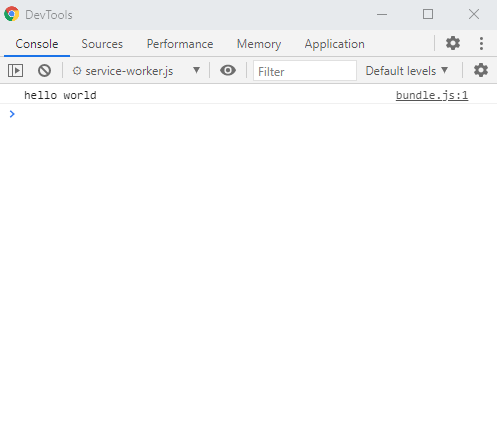
        <span class="nx">console</span><span class="p">.</span><span class="nx">log</span><span class="p">(</span><span class="dl">'</span><span class="s1">hello world</span><span class="dl">'</span><span class="p">)</span>
    <span class="p">}</span>
<span class="p">}</span>

<span class="k">export</span> <span class="p">{</span>
    <span class="nx">Example</span>
<span class="p">}</span>
</code></pre></div></div>

<p>Setup your webpack.config.js file and run webpack:</p>

<p><a href="https://github.com/tbrockman/webpack-manifest-v3-example/blob/master/webpack.config.js"><code class="language-plaintext highlighter-rouge">webpack.config.js</code></a></p>
<div class="language-javascript highlighter-rouge"><div class="highlight"><pre class="highlight"><code><span class="kd">const</span> <span class="nx">path</span> <span class="o">=</span> <span class="nx">require</span><span class="p">(</span><span class="dl">'</span><span class="s1">path</span><span class="dl">'</span><span class="p">);</span>

<span class="nx">module</span><span class="p">.</span><span class="nx">exports</span> <span class="o">=</span> <span class="p">{</span>
  <span class="na">mode</span><span class="p">:</span> <span class="dl">'</span><span class="s1">production</span><span class="dl">'</span><span class="p">,</span>
  <span class="na">entry</span><span class="p">:</span> <span class="dl">'</span><span class="s1">./src/index.js</span><span class="dl">'</span><span class="p">,</span>
  <span class="c1">// This will output a single file under `dist/bundle.js`</span>
  <span class="na">output</span><span class="p">:</span> <span class="p">{</span>
    <span class="na">filename</span><span class="p">:</span> <span class="dl">'</span><span class="s1">bundle.js</span><span class="dl">'</span><span class="p">,</span>
    <span class="na">path</span><span class="p">:</span> <span class="nx">path</span><span class="p">.</span><span class="nx">resolve</span><span class="p">(</span><span class="nx">__dirname</span><span class="p">,</span> <span class="dl">'</span><span class="s1">dist</span><span class="dl">'</span><span class="p">),</span>
  <span class="p">}</span>
<span class="p">}</span>
</code></pre></div></div>

<div class="language-shell highlighter-rouge"><div class="highlight"><pre class="highlight"><code><span class="o">&gt;</span> webpack

asset bundle.js 76 bytes <span class="o">[</span>compared <span class="k">for </span>emit] <span class="o">[</span>minimized] <span class="o">(</span>name: main<span class="o">)</span>
orphan modules 112 bytes <span class="o">[</span>orphan] 1 module
./src/index.js + 1 modules 183 bytes <span class="o">[</span>built] <span class="o">[</span>code generated]
webpack 5.28.0 compiled successfully <span class="k">in </span>177 ms
</code></pre></div></div>

<p>Create your service worker entrypoint, importing the produced bundle:</p>

<p><a href="https://github.com/tbrockman/webpack-manifest-v3-example/blob/master/service-worker.js"><code class="language-plaintext highlighter-rouge">service-worker.js</code></a></p>
<div class="language-javascript highlighter-rouge"><div class="highlight"><pre class="highlight"><code><span class="k">try</span> <span class="p">{</span>
    <span class="c1">// This is the file produced by webpack</span>
    <span class="nx">importScripts</span><span class="p">(</span><span class="dl">'</span><span class="s1">dist/bundle.js</span><span class="dl">'</span><span class="p">);</span>
<span class="p">}</span> <span class="k">catch</span> <span class="p">(</span><span class="nx">e</span><span class="p">)</span> <span class="p">{</span>
    <span class="c1">// This will allow you to see error logs during registration/execution</span>
    <span class="nx">console</span><span class="p">.</span><span class="nx">error</span><span class="p">(</span><span class="nx">e</span><span class="p">);</span>
<span class="p">}</span>
</code></pre></div></div>

<p>Reference the file in your manifest:</p>

<p><a href="https://github.com/tbrockman/webpack-manifest-v3-example/blob/master/manifest.json"><code class="language-plaintext highlighter-rouge">manifest.json</code></a></p>
<div class="language-javascript highlighter-rouge"><div class="highlight"><pre class="highlight"><code><span class="p">{</span>
    <span class="dl">"</span><span class="s2">name</span><span class="dl">"</span><span class="p">:</span> <span class="dl">"</span><span class="s2">webpack-manifest-v3-example</span><span class="dl">"</span><span class="p">,</span>
    <span class="dl">"</span><span class="s2">author</span><span class="dl">"</span><span class="p">:</span> <span class="dl">"</span><span class="s2">Theodore Brockman</span><span class="dl">"</span><span class="p">,</span>
    <span class="dl">"</span><span class="s2">version</span><span class="dl">"</span><span class="p">:</span> <span class="dl">"</span><span class="s2">1.0.0</span><span class="dl">"</span><span class="p">,</span>
    <span class="dl">"</span><span class="s2">description</span><span class="dl">"</span><span class="p">:</span> <span class="dl">"</span><span class="s2">A Chrome extension packed using Webpack.</span><span class="dl">"</span><span class="p">,</span>
    <span class="dl">"</span><span class="s2">permissions</span><span class="dl">"</span><span class="p">:</span> <span class="p">[],</span>
    <span class="dl">"</span><span class="s2">background</span><span class="dl">"</span><span class="p">:</span> <span class="p">{</span>
        <span class="dl">"</span><span class="s2">service_worker</span><span class="dl">"</span><span class="p">:</span> <span class="dl">"</span><span class="s2">service-worker.js</span><span class="dl">"</span>
    <span class="p">},</span>
    <span class="dl">"</span><span class="s2">manifest_version</span><span class="dl">"</span><span class="p">:</span> <span class="mi">3</span>
<span class="p">}</span>
</code></pre></div></div>

<p><a href="chrome://extensions/">Load your unpacked extension</a> and inspect the service worker view to check the output:</p>

<p><img src="/assets/img/webpack_manifest_console_output.png" alt="" /></p>

<p>Done.</p>]]></content><author><name>Theodore Brockman</name></author><category term="webpack" /><category term="mv3" /><category term="chrome" /><summary type="html"><![CDATA[A guide to make up for some of the sparse documentation available on the internet about using Webpack in v3 Chrome extensions.]]></summary></entry><entry><title type="html">prune 🍇</title><link href="https://theo.lol/oss/chrome/2021/01/27/prune.html" rel="alternate" type="text/html" title="prune 🍇" /><published>2021-01-27T05:47:00+00:00</published><updated>2021-01-27T05:47:00+00:00</updated><id>https://theo.lol/oss/chrome/2021/01/27/prune</id><content type="html" xml:base="https://theo.lol/oss/chrome/2021/01/27/prune.html"><![CDATA[<p>If you’re like me you often find you have more tabs open than you plan on reading, and are usually too lazy to clean them up properly.</p>

<p><img src="/assets/img/prune_many_tabs.png" alt="Many tabs" />
<em>that was actually a pretty light day</em></p>

<p>Maybe you have multiple tabs of the same page open because you lost where the last one was.</p>

<p><img src="/assets/img/prune_gmails.png" alt="Multiple g-mail tabs open" />
<em>career success is proportional to the number of times you check your e-mail</em></p>
<p>You may even have some articles that you don’t think are important enough to bookmark, yet you don’t have the willpower to close them on your own.</p>

<p><img src="/assets/img/prune_one_day.png" alt="Rust book testing tab" />
<em>tests are just for people who don’t believe in themselves anyways</em></p>

<p>I’m frequently guilty of all these things, so I decided to work on a quick little thingy to make my life easier.</p>

<p><a href="https://chrome.google.com/webstore/detail/prune/gblddboefgbljpngfhgekbpoigikbenh?hl=en"><img src="/assets/img/prune_logo.jpg" alt="Prune logo" /></a></p>

<p>…is a small Chrome extension that will prevent you from opening any duplicate tabs. Instead, it’ll just focus the one you already have opened.</p>

<p>You can download it on the Chrome store <a href="https://chrome.google.com/webstore/detail/prune/gblddboefgbljpngfhgekbpoigikbenh?hl=en">here</a>.</p>

<p>You can also set it up to automatically close tabs you haven’t looked at in awhile, with a configurable threshold for determining inactivity. I’ve been experimenting with having my tabs snipped away after a week of inattention, which seems to work for me.</p>

<p>If you’re worried you’re not brave enough to let go of your old tabs, don’t forget you can <a href="chrome://history/">still look at your history</a> if you weren’t ready to move on and find yourself missing some of them later.</p>

<p>Hope you like it!</p>]]></content><author><name>Theodore Brockman</name></author><category term="oss" /><category term="chrome" /><summary type="html"><![CDATA[A small Chrome extension to help you trim and manage your garden of tabs.]]></summary></entry><entry><title type="html">hello world 👋</title><link href="https://theo.lol/security/github/oss/utterances/2020/11/02/hello-world.html" rel="alternate" type="text/html" title="hello world 👋" /><published>2020-11-02T01:18:00+00:00</published><updated>2020-11-02T01:18:00+00:00</updated><id>https://theo.lol/security/github/oss/utterances/2020/11/02/hello-world</id><content type="html" xml:base="https://theo.lol/security/github/oss/utterances/2020/11/02/hello-world.html"><![CDATA[<p>Another day, another <code class="language-plaintext highlighter-rouge">hello world</code> software developer blog post.</p>

<p>My first blog post is about me finding a small issue allowing abuse of an open-source application, me notifying the author poorly, the issue not being addressed, and me creating a fork that solves the problem.</p>

<p>Let’s get into it.</p>

<h2 id="utterances">Utterances</h2>

<p><a href="https://utteranc.es">Utterances</a> is an open-source Typescript plugin which integrates with <a href="https://github.com">GitHub</a> to allow comment sections backed by <a href="https://github.com/tbrockman/tbrockman.github.io/issues">GitHub issues</a>, which when you combine it with something like <a href="https://pages.github.com/">GitHub pages</a>, gives the ability to host a static website with comments, for <strong>free</strong>! It also looks pretty nice and works on mobile.</p>

<p>Being impressed by the plugin (and suspicious of things that implement OAuth flows), I was curious to know how this little comment section worked.</p>

<div class="language-html highlighter-rouge"><div class="highlight"><pre class="highlight"><code><span class="nt">&lt;script </span><span class="na">src=</span><span class="s">"https://utteranc.es/client.js"</span>
        <span class="na">repo=</span><span class="s">"tbrockman/tbrockman.github.io"</span>
        <span class="na">issue-term=</span><span class="s">"hello world 👋"</span>
        <span class="na">theme=</span><span class="s">"github-light"</span>
        <span class="na">crossorigin=</span><span class="s">"anonymous"</span>
        <span class="na">async</span><span class="nt">&gt;</span>
</code></pre></div></div>

<p>With the above script included on your webpage, Utterances will inject an iframe at the scripts location, and attempt to retrieve the comments linked to an issue specified by the repo and issue-term. It will then render all comments (with remarkably similar styling to GitHub) in its place.</p>

<h2 id="helpful-features">Helpful features</h2>

<p>It’s one more step to navigate to GitHub directly to post comments on an issue itself, so the author implemented a simple OAuth flow that allows user to permit the app access to create comments on their behalf, which is pretty nice!</p>

<p><img src="/assets/img/utterance_signin_to_comment.png" alt="Utterances sign-in to comment" /></p>

<p><em>which then brings you to…</em></p>

<p><img src="/assets/img/utterance_oauth_prompt.png" alt="Utterances OAuth prompt" /></p>

<p>And afterwards you’re able to comment, <em>just like you’re on GitHub!</em></p>

<p><img src="/assets/img/utterance_comments.png" alt="Utterances comments" /></p>

<p>Usually I just give access to any of my accounts whenever anyone asks for it (<em>what’s the worst that could happen?</em>), but the application is open-source so I thought I may aswell peek around a little bit.</p>

<h2 id="investigation">Investigation</h2>

<p>Tracing the code from the start of the flow, we see the <code class="language-plaintext highlighter-rouge">Sign in to comment</code> button sends us to an endpoint from the Utterances API with a redirect parameter back to our original website.</p>

<p><a href="https://github.com/utterance/utterances/blob/master/src/new-comment-component.ts#L72"><code class="language-plaintext highlighter-rouge">utterances/src/new-comment-component.ts#L72</code></a></p>
<div class="language-html highlighter-rouge"><div class="highlight"><pre class="highlight"><code><span class="nt">&lt;a</span> <span class="na">class=</span><span class="s">"btn btn-primary"</span> <span class="na">href=</span><span class="s">"${getLoginUrl(page.url)}"</span> <span class="na">target=</span><span class="s">"_top"</span><span class="nt">&gt;</span>Sign in to comment<span class="nt">&lt;/a&gt;</span>
</code></pre></div></div>

<p><a href="https://github.com/utterance/utterances/blob/master/src/oauth.ts#L7"><code class="language-plaintext highlighter-rouge">utterances/src/oauth.ts#L7</code></a></p>
<div class="language-javascript highlighter-rouge"><div class="highlight"><pre class="highlight"><code><span class="k">export</span> <span class="kd">function</span> <span class="nx">getLoginUrl</span><span class="p">(</span><span class="nx">redirect_uri</span><span class="p">:</span> <span class="nx">string</span><span class="p">)</span> <span class="p">{</span>
  <span class="k">return</span> <span class="s2">`</span><span class="p">${</span><span class="nx">UTTERANCES_API</span><span class="p">}</span><span class="s2">/authorize?</span><span class="p">${</span><span class="nx">param</span><span class="p">({</span> <span class="nx">redirect_uri</span> <span class="p">})}</span><span class="s2">`</span><span class="p">;</span>
<span class="p">}</span>
</code></pre></div></div>

<p>Going to the backend code, you can see that the Utterances API generates some secret state and builds a redirect URL to request the necessary scopes for the user from GitHub, and sets a URL where the user will be redirected should they approve the request.</p>

<p><a href="https://github.com/utterance/utterances-oauth/blob/master/src/routes.ts#L74"><code class="language-plaintext highlighter-rouge">utterances-oauth/src/routes.ts#L74</code></a></p>
<div class="language-javascript highlighter-rouge"><div class="highlight"><pre class="highlight"><code><span class="k">async</span> <span class="kd">function</span> <span class="nx">authorizeRequestHandler</span><span class="p">(</span><span class="nx">origin</span><span class="p">:</span> <span class="nx">string</span><span class="p">,</span> <span class="nx">search</span><span class="p">:</span> <span class="nx">URLSearchParams</span><span class="p">)</span> <span class="p">{</span>
  <span class="kd">const</span> <span class="p">{</span> <span class="nx">client_id</span><span class="p">,</span> <span class="nx">state_password</span> <span class="p">}</span> <span class="o">=</span> <span class="nx">settings</span><span class="p">;</span>

  <span class="kd">const</span> <span class="nx">appReturnUrl</span> <span class="o">=</span> <span class="nx">search</span><span class="p">.</span><span class="kd">get</span><span class="p">(</span><span class="dl">'</span><span class="s1">redirect_uri</span><span class="dl">'</span><span class="p">);</span>

  <span class="k">if</span> <span class="p">(</span><span class="o">!</span><span class="nx">appReturnUrl</span><span class="p">)</span> <span class="p">{</span>
    <span class="k">return</span> <span class="nx">badRequest</span><span class="p">(</span><span class="s2">`"redirect_uri" is required.`</span><span class="p">);</span>
  <span class="p">}</span>

  <span class="kd">const</span> <span class="nx">state</span> <span class="o">=</span> <span class="k">await</span> <span class="nx">encodeState</span><span class="p">(</span><span class="nx">appReturnUrl</span><span class="p">,</span> <span class="nx">state_password</span><span class="p">);</span>
  <span class="kd">const</span> <span class="nx">redirect_uri</span> <span class="o">=</span> <span class="nx">origin</span> <span class="o">+</span> <span class="dl">'</span><span class="s1">/authorized</span><span class="dl">'</span><span class="p">;</span>
  <span class="k">return</span> <span class="k">new</span> <span class="nx">Response</span><span class="p">(</span><span class="kc">undefined</span><span class="p">,</span> <span class="p">{</span>
    <span class="na">status</span><span class="p">:</span> <span class="mi">302</span><span class="p">,</span>
    <span class="na">statusText</span><span class="p">:</span> <span class="dl">'</span><span class="s1">found</span><span class="dl">'</span><span class="p">,</span>
    <span class="na">headers</span><span class="p">:</span> <span class="p">{</span>
      <span class="na">Location</span><span class="p">:</span> <span class="s2">`</span><span class="p">${</span><span class="nx">authorizeUrl</span><span class="p">}</span><span class="s2">?</span><span class="p">${</span><span class="k">new</span> <span class="nx">URLSearchParams</span><span class="p">({</span> <span class="nx">client_id</span><span class="p">,</span> <span class="nx">redirect_uri</span><span class="p">,</span> <span class="nx">state</span> <span class="p">})}</span><span class="s2">`</span>
    <span class="p">}</span>
  <span class="p">});</span>
<span class="p">}</span>
</code></pre></div></div>

<p>Assuming successful parsing of authorization code and state (passed as URL query parameters), it uses the retrieved information for acquiring an access token from GitHub, which will then be stored as a cookie to be sent along with future requests to the Utterances API.</p>

<p><a href="https://github.com/utterance/utterances-oauth/blob/master/src/routes.ts#L123"><code class="language-plaintext highlighter-rouge">utterances-oauth/src/routes.ts#L123</code></a></p>
<div class="language-javascript highlighter-rouge"><div class="highlight"><pre class="highlight"><code><span class="kd">let</span> <span class="nx">accessToken</span><span class="p">:</span> <span class="nx">string</span><span class="p">;</span>
<span class="k">try</span> <span class="p">{</span>
  <span class="kd">const</span> <span class="nx">response</span> <span class="o">=</span> <span class="k">await</span> <span class="nx">fetch</span><span class="p">(</span><span class="nx">accessTokenUrl</span><span class="p">,</span> <span class="nx">init</span><span class="p">);</span>
  <span class="k">if</span> <span class="p">(</span><span class="nx">response</span><span class="p">.</span><span class="nx">ok</span><span class="p">)</span> <span class="p">{</span>
    <span class="kd">const</span> <span class="nx">data</span> <span class="o">=</span> <span class="k">await</span> <span class="nx">response</span><span class="p">.</span><span class="nx">json</span><span class="p">();</span>
    <span class="nx">accessToken</span> <span class="o">=</span> <span class="nx">data</span><span class="p">.</span><span class="nx">access_token</span><span class="p">;</span>
  <span class="p">}</span> <span class="k">else</span> <span class="p">{</span>
    <span class="k">throw</span> <span class="k">new</span> <span class="nb">Error</span><span class="p">(</span><span class="s2">`Access token response had status </span><span class="p">${</span><span class="nx">response</span><span class="p">.</span><span class="nx">status</span><span class="p">}</span><span class="s2">.`</span><span class="p">);</span>
  <span class="p">}</span>
<span class="p">}</span> <span class="k">catch</span> <span class="p">(</span><span class="nx">_</span><span class="p">)</span> <span class="p">{</span>
  <span class="k">return</span> <span class="k">new</span> <span class="nx">Response</span><span class="p">(</span><span class="dl">'</span><span class="s1">Unable to load token from GitHub.</span><span class="dl">'</span><span class="p">);</span>
<span class="p">}</span>

<span class="kd">const</span> <span class="nx">url</span> <span class="o">=</span> <span class="k">new</span> <span class="nx">URL</span><span class="p">(</span><span class="nx">returnUrl</span><span class="p">);</span>
<span class="nx">url</span><span class="p">.</span><span class="nx">searchParams</span><span class="p">.</span><span class="kd">set</span><span class="p">(</span><span class="dl">'</span><span class="s1">utterances</span><span class="dl">'</span><span class="p">,</span> <span class="nx">accessToken</span><span class="p">);</span>

<span class="k">return</span> <span class="k">new</span> <span class="nx">Response</span><span class="p">(</span><span class="kc">undefined</span><span class="p">,</span> <span class="p">{</span>
  <span class="na">status</span><span class="p">:</span> <span class="mi">302</span><span class="p">,</span>
  <span class="na">statusText</span><span class="p">:</span> <span class="dl">'</span><span class="s1">found</span><span class="dl">'</span><span class="p">,</span>
  <span class="na">headers</span><span class="p">:</span> <span class="p">{</span>
    <span class="dl">'</span><span class="s1">Location</span><span class="dl">'</span><span class="p">:</span> <span class="nx">url</span><span class="p">.</span><span class="nx">href</span><span class="p">,</span>
    <span class="dl">'</span><span class="s1">Set-Cookie</span><span class="dl">'</span><span class="p">:</span> <span class="s2">`token=</span><span class="p">${</span><span class="nx">accessToken</span><span class="p">}</span><span class="s2">; Path=/token; HttpOnly; Secure; SameSite=None; Max-Age=</span><span class="p">${</span><span class="mi">60</span> <span class="o">*</span> <span class="mi">60</span> <span class="o">*</span> <span class="mi">24</span> <span class="o">*</span> <span class="mi">356</span><span class="p">}</span><span class="s2">`</span>
  <span class="p">}</span>
<span class="p">});</span>
</code></pre></div></div>

<p>So overall, a relatively fine and safe implementation. Utterances procurs an access token, and then sends it back for me to use to interact directly with the GitHub API. Perfectly reasonable.</p>

<p><em>…for the most part.</em></p>

<h2 id="maybe-too-helpful">Maybe too helpful</h2>

<p>In order to be even <em>more</em> convenient, Utterances will sometimes go through the work of posting GitHub issues for you. If the issue the script references doesn’t exist yet and someone tries to comment, the script will send a request to the Utterances API to create the missing issue.</p>

<p><img src="/assets/img/utterance_bot_issue_creation.png" alt="Utterance bot creating an issue" /></p>

<p>Looking into the code, we can see the section where if there is no issue, it sends a create issue request.</p>

<p><a href="https://github.com/utterance/utterances/blob/master/src/utterances.ts#L57"><code class="language-plaintext highlighter-rouge">utterances/src/utterances.ts#L57</code></a></p>
<div class="language-javascript highlighter-rouge"><div class="highlight"><pre class="highlight"><code><span class="kd">const</span> <span class="nx">submit</span> <span class="o">=</span> <span class="k">async</span> <span class="p">(</span><span class="nx">markdown</span><span class="p">:</span> <span class="nx">string</span><span class="p">)</span> <span class="o">=&gt;</span> <span class="p">{</span>
  <span class="k">await</span> <span class="nx">assertOrigin</span><span class="p">();</span>
  <span class="k">if</span> <span class="p">(</span><span class="o">!</span><span class="nx">issue</span><span class="p">)</span> <span class="p">{</span>
    <span class="nx">issue</span> <span class="o">=</span> <span class="k">await</span> <span class="nx">createIssue</span><span class="p">(</span>
      <span class="nx">page</span><span class="p">.</span><span class="nx">issueTerm</span> <span class="k">as</span> <span class="nx">string</span><span class="p">,</span>
      <span class="nx">page</span><span class="p">.</span><span class="nx">url</span><span class="p">,</span>
      <span class="nx">page</span><span class="p">.</span><span class="nx">title</span><span class="p">,</span>
      <span class="nx">page</span><span class="p">.</span><span class="nx">description</span> <span class="o">||</span> <span class="dl">''</span><span class="p">,</span>
      <span class="nx">page</span><span class="p">.</span><span class="nx">label</span>
    <span class="p">);</span>
    <span class="nx">timeline</span><span class="p">.</span><span class="nx">setIssue</span><span class="p">(</span><span class="nx">issue</span><span class="p">);</span>
  <span class="p">}</span>
  <span class="kd">const</span> <span class="nx">comment</span> <span class="o">=</span> <span class="k">await</span> <span class="nx">postComment</span><span class="p">(</span><span class="nx">issue</span><span class="p">.</span><span class="nx">number</span><span class="p">,</span> <span class="nx">markdown</span><span class="p">);</span>
  <span class="nx">timeline</span><span class="p">.</span><span class="nx">insertComment</span><span class="p">(</span><span class="nx">comment</span><span class="p">,</span> <span class="kc">true</span><span class="p">);</span>
  <span class="nx">newCommentComponent</span><span class="p">.</span><span class="nx">clear</span><span class="p">();</span>
<span class="p">};</span>
</code></pre></div></div>

<p>The handler for that request is so eager to please, it almost immediately starts to create the specified issue for you, it only checks that you’re an authenticated GitHub user first.</p>

<p><a href="https://github.com/utterance/utterances-oauth/blob/master/src/routes.ts#L123"><code class="language-plaintext highlighter-rouge">utterances-oauth/src/routes.ts#L123</code></a></p>
<div class="language-javascript highlighter-rouge"><div class="highlight"><pre class="highlight"><code><span class="kd">const</span> <span class="nx">authInit</span> <span class="o">=</span> <span class="p">{</span>
  <span class="na">method</span><span class="p">:</span> <span class="dl">'</span><span class="s1">GET</span><span class="dl">'</span><span class="p">,</span>
  <span class="na">headers</span><span class="p">:</span> <span class="p">{</span>
    <span class="dl">'</span><span class="s1">Authorization</span><span class="dl">'</span><span class="p">:</span> <span class="nx">authorization</span><span class="p">,</span>
    <span class="dl">'</span><span class="s1">User-Agent</span><span class="dl">'</span><span class="p">:</span> <span class="dl">'</span><span class="s1">utterances</span><span class="dl">'</span>
  <span class="p">}</span>
<span class="p">};</span>

<span class="kd">let</span> <span class="nx">authenticated</span> <span class="o">=</span> <span class="kc">false</span><span class="p">;</span>
<span class="k">try</span> <span class="p">{</span>
  <span class="kd">const</span> <span class="nx">response</span> <span class="o">=</span> <span class="k">await</span> <span class="nx">fetch</span><span class="p">(</span><span class="dl">'</span><span class="s1">https://api.github.com/user</span><span class="dl">'</span><span class="p">,</span> <span class="nx">authInit</span><span class="p">);</span>
  <span class="nx">authenticated</span> <span class="o">=</span> <span class="nx">response</span><span class="p">.</span><span class="nx">ok</span><span class="p">;</span>
<span class="p">}</span> <span class="k">catch</span> <span class="p">(</span><span class="nx">_</span><span class="p">)</span> <span class="p">{</span>
<span class="p">}</span>
<span class="k">if</span> <span class="p">(</span><span class="o">!</span><span class="nx">authenticated</span><span class="p">)</span> <span class="p">{</span>
  <span class="k">return</span> <span class="k">new</span> <span class="nx">Response</span><span class="p">(</span><span class="kc">undefined</span><span class="p">,</span> <span class="p">{</span> <span class="na">status</span><span class="p">:</span> <span class="mi">401</span><span class="p">,</span> <span class="na">statusText</span><span class="p">:</span> <span class="dl">'</span><span class="s1">not authorized</span><span class="dl">'</span> <span class="p">});</span>
<span class="p">}</span>

<span class="kd">const</span> <span class="nx">init</span> <span class="o">=</span> <span class="p">{</span>
  <span class="na">method</span><span class="p">:</span> <span class="dl">'</span><span class="s1">POST</span><span class="dl">'</span><span class="p">,</span>
  <span class="na">headers</span><span class="p">:</span> <span class="p">{</span>
    <span class="dl">'</span><span class="s1">Authorization</span><span class="dl">'</span><span class="p">:</span> <span class="dl">'</span><span class="s1">token </span><span class="dl">'</span> <span class="o">+</span> <span class="nx">settings</span><span class="p">.</span><span class="nx">bot_token</span><span class="p">,</span>
    <span class="dl">'</span><span class="s1">User-Agent</span><span class="dl">'</span><span class="p">:</span> <span class="dl">'</span><span class="s1">utterances</span><span class="dl">'</span><span class="p">,</span>
  <span class="p">},</span>
  <span class="na">body</span><span class="p">:</span> <span class="nx">request</span><span class="p">.</span><span class="nx">body</span>
<span class="p">};</span>
<span class="k">try</span> <span class="p">{</span>
  <span class="kd">const</span> <span class="nx">response</span> <span class="o">=</span> <span class="k">await</span> <span class="nx">fetch</span><span class="p">(</span><span class="s2">`https://api.github.com</span><span class="p">${</span><span class="nx">path</span><span class="p">}</span><span class="s2">`</span><span class="p">,</span> <span class="nx">init</span><span class="p">);</span>
  <span class="p">...</span>
</code></pre></div></div>

<p>This means that any authenticated GitHub user can use the Utterances API to create issues anywhere the bot is allowed. A single account could be used by a malicious actor to cause all incoming requests to the application fail, simply by consuming the bots rate-limit for issue creation.</p>

<h2 id="proof-of-concept">Proof of concept</h2>

<p>As someone who rarely informs others of application vulnerabilities, I made an error before responsibly disclosing the issue. Initially, I wanted to test out what I had found (and didn’t believe it would honestly work), so I sent a handcrafted request to the Utterances API server which ended up <a href="https://github.com/utterance/utterances/issues/380">working and immediately unveiling the vulnerability</a>.</p>

<p><img src="/assets/img/utterance_testing_vulnerability.png" alt="Testing the Utterances vulernability" /></p>

<p>Frantically, realizing I had goofed, I sought to contact the author in an e-mail and apologize for my lack of tact:</p>
<blockquote>
  <p><strong>Theo:</strong></p>

  <p>Hey! I recently found out about Utterances and was super excited to implement it into my own website as I work through a redesign, and then became curious as to how things worked on the backend to prevent things like people maliciously spamming GitHub issue creation using the API token that the API provides to the client.</p>

  <p>Not to cause you too much alarm or anything, and perhaps you’re already aware of this, but the way the backend is currently setup allows anyone to take that token and create arbitrarily many GitHub issues on any configured repositories, proof of the vulnerability here: <a href="https://github.com/utterance/utterances/issues/380">https://github.com/utterance/utterances/issues/380</a> (sorry for testing this out in a public place, in retrospect I realize this wasn’t very tactful and I didn’t think about it until after it was already done)</p>

  <p>That said, I’m very passionate about the project, and if GitHub doesn’t have any plans to adopt Utterances directly into GitHub pages or anything that would make my work obsolete, I would love to help address the vulnerability!</p>
</blockquote>

<p>After taking a few days to reply, the author indicated they did not believe this to be an issue:</p>

<blockquote>
  <p><strong>Author:</strong></p>

  <p>Hi Theodore,</p>

  <p>I don’t think this is a vulnerability. The API token generated by utterances is specific to the user. Any user can generate a much more permissive personal access token using the github user interface:
<a href="https://docs.github.com/en/github/authenticating-to-github/creating-a-personal-access-token#creating-a-token">https://docs.github.com/en/github/authenticating-to-github/creating-a-personal-access-token#creating-a-token</a></p>
</blockquote>

<p>I began to doubt myself and whether what I had found really <em>was</em> a problem. Was my understanding of the backend flawed? Did I know <em>anything</em>? Was I just an overeager <em>dumb dumb</em>?</p>

<p>I decided I just hadn’t been clear enough in my communication:</p>

<blockquote>
  <p><strong>Theo:</strong></p>

  <p>Sorry, let me try to describe some of what the flow of the backend seems like, and what potential issues could arise as a result (and I did have a misconception initially, I thought the token being passed back to the client was Utterances application token):</p>

  <ol>
    <li>For the issue creation API endpoint, Utterances uses the access token provided to make a request to <a href="https://api.github.com/user">https://api.github.com/user</a>, verifying that the token belongs to an authenticated user
      <ul>
        <li><strong>Issue</strong>: Without any rate-limiting on this endpoint, a malicious user can spam this endpoint (either with a valid or invalid token), and consume the rate limit budget of the IP address, meaning that subsequent requests to determine whether a user is valid from the same IP address would fail, and so all issue creation from that IP address would fail for Utterance users.</li>
      </ul>
    </li>
    <li><strong>[Bigger problem]</strong> For the issue creation API endpoint, Utterances uses its own token to create the issue once verifying the the request originated from an authenticated user
      <ul>
        <li><strong>Issue</strong>: Without rate-limiting or validation, a malicious user with a valid token can spam this endpoint and consume the rate limit budget of the application, creating many issues that will be traceable to the Utterances bot (which could potentially get the application removed), as well as preventing the creation of issues through the bot for legitimate users (due to the rate limit being reached).</li>
      </ul>
    </li>
  </ol>

  <p>Of course there’s the possibility I’ve misunderstood the backend code, but hopefully this clarifies what I see as potential issues!</p>
</blockquote>

<p>Through incredible verbosity I was successful. They lowered their guard:</p>

<blockquote>
  <p><strong>Author</strong>:</p>

  <p>1 and 2 are correct. Utterances relies on github’s rate limiting. It would not make sense to create issues with the user’s access token because the user would later be able to modify the title/body resulting in the issue becoming unlinked from the blog post.</p>
</blockquote>

<p>… I then ruined my progress but suggesting a pretty poor fix that was:</p>
<ol>
  <li>Overcomplicated</li>
  <li>Required <strong>more</strong> server-side processing and resources</li>
  <li>Wrong</li>
</ol>

<p>Needless to say I lost the authors faith, and have not yet heard back.</p>

<h2 id="onward-and-upward">Onward and upward</h2>

<p>I don’t blame the author for not responding. I can’t imagine it’s enjoyable maintaining an open-source project for free, let alone having random strangers come to you with <em>more</em> work they want you to do. It would have been cool to work on fixing the problem together, but everything can’t always work out the way you’d hoped.</p>

<p>But we persevere.</p>

<p>Ruminating on my failure a bit, I thought of more realistic ways to keep the same user-friendliness, while also avoiding having to deal with people who like to ruin things, and without spending more money.</p>

<p>The crux of the problem is that we want a way of automatically creating GitHub issues whenever we make a new blog post. For most people linking their blog posts to GitHub issues, they’re probably hosting their blog on GitHub. For those people hosting their blog on GitHub, they’re probably using <a href="https://jekyllrb.com/">Jekyll</a>.</p>

<p>From this, we can assume that any of our blog posts will reside in a folder (probably <code class="language-plaintext highlighter-rouge">_posts</code>), and if we have access to all the text within those files we can copy that to the GitHub issue if we want to, and if we want to we can do all of it using…</p>

<h2 id="github-actions">GitHub Actions</h2>

<p>Heard enough about these yet?</p>

<blockquote>
  <p>“GitHub Actions usage is free for public repositories and self-hosted runners” - <a href="https://docs.github.com/en/free-pro-team@latest/github/setting-up-and-managing-billing-and-payments-on-github/about-billing-for-github-actions">GitHub</a></p>
</blockquote>

<p>If you’re using GitHub issues for blogs, your GitHub repo is probably public anyways, so this route is free so long as you’re not creating more than one blog every few seconds or so. Within GitHub Actions, you even have access to a secret that contains an access token which you can use to create issues through the GitHub API.</p>

<p>I made <a href="https://github.com/marketplace/actions/social-action">this GitHub Action</a> which, when given a configuration file <code class="language-plaintext highlighter-rouge">.github/social.yml</code> containing something like the following, will automatically create new issues for you as necessary:</p>

<div class="language-yml highlighter-rouge"><div class="highlight"><pre class="highlight"><code><span class="na">api_version</span><span class="pi">:</span> <span class="s">v1/social</span> <span class="c1"># versioned configuration API</span>

<span class="na">renderer</span><span class="pi">:</span> <span class="s">jekyll</span> <span class="c1"># this is the only format which is supported</span>
                 <span class="c1"># but perhaps one day there might be more</span>
                                 
<span class="na">content</span><span class="pi">:</span> <span class="s">full</span> <span class="c1"># what type of content to display for the post </span>
              <span class="c1"># 'full' will display entire blog post in the GitHub issue</span>
              <span class="c1"># there are currently no other modes</span>

<span class="na">base_url</span><span class="pi">:</span> <span class="s1">'</span><span class="s">https://theo.lol'</span> <span class="c1"># used for resolving relative links</span>

<span class="na">paths</span><span class="pi">:</span>       <span class="c1"># list of Glob patterns which will </span>
  <span class="pi">-</span> <span class="s">_posts/*</span> <span class="c1"># match blog posts to create issues from</span>
</code></pre></div></div>

<p>It imports Jekyll, renders any posts it has to, and then uses the rendered content to create issues as necessary.</p>

<p>After finishing the GitHub action I deployed my own version of the API which <em>doesn’t</em> bend over backwards to create issues for you, and set a fork of the Utterances client to point to it (which you can find and use <a href="https://theo.lol/client.js">here</a>). It doesn’t contain any of the automatic issue creation code.</p>

<p>That’s it, that’s all there is to it.</p>

<h2 id="conclusion">Conclusion</h2>

<p>I think I would get in trouble if I tried to name this application <code class="language-plaintext highlighter-rouge">GitHub Social</code>, but if anyone at Microsoft wants to make it a reality send me a message.</p>

<p>Let’s just call it <code class="language-plaintext highlighter-rouge">Social</code> instead for now.</p>

<p><a href="https://github.com/marketplace/actions/social-action">You can start using it here.</a></p>

<p>You can also check out the code on GitHub:</p>

<ol>
  <li><a href="https://github.com/tbrockman/social-action">The GitHub Action</a></li>
  <li><a href="https://github.com/tbrockman/social-oauth">Utterances API</a></li>
  <li><a href="https://github.com/tbrockman/utterances">Utterances</a></li>
</ol>

<p>And see how everything works in the comments below.</p>]]></content><author><name>Theodore Brockman</name></author><category term="security" /><category term="github" /><category term="oss" /><category term="utterances" /><summary type="html"><![CDATA[Come join me on a journey of discovery and disappointment as I investigate Utterances, a popular third-party GitHub application.]]></summary></entry></feed>